Skip to content
GroupbuySeoTools.meGroupbuySeoTools.me
  • Login
  • Cart
    • No products in the cart.

      Return to shop

  • Cart

    No products in the cart.

    Return to shop

  • Categories
    • AI All-in-One
      • Ecom Tools
        • Contact
      • Others
        • AML Policy
    • AI
    • AI Audio
      • Ecom Tools
    • AI Dev Tools
    • Ad Spy
  • AI All-in-One
  • Ad Spy
  • Cloud & Storage
  • Edu Tools
  • Relax Tools
  • Ecom Tools
  • AI Dev Tools
  • AI Audio

    Home - Design Tools - Autodesk All Apps

    Add to wishlist
    Autodesk All Apps
    0 Customer Reviews
    0 Sold
    Warranty Policy
    Rating
    0

    Autodesk All Apps

    $13.00 – $51.00Price range: $13.00 through $51.00

    • Maya
    • Arnold
    • Inventor
    • All App
    • Fusion 360
    • 3DS Max
    • AutoCAD
    • MudBox
    • Civil 3D
    • Revit
    • Robot
    Clear
    Delivery

    Sent via customer’s email

    Delivery Time

    12-24hrs

    Warranty

    All-in-one Subscription

    Product Summary

    Autodesk All Apps  – solution for architecture, engineering, and 3D design professionals

    • You will receive: a Autodesk – corresponding package (upgrade to your primary email account)

    Official website: https://www.autodesk.com
    Product Information
    • Description
    • Additional information

    Contents

    1. What Is Autodesk All Apps?
    2. What products are included in Autodesk All Apps?
    3. Advantages of Autodesk All Apps
    4. Disadvantages of Autodesk All Apps
    5. How Much Does a Licensed Autodesk All Apps Account Cost?
    6. Why Choose an Affordable Autodesk All Apps Account from GroupbuySeoTools?
    7. How to Upgrade Autodesk All Apps with GroupbuySeoTools
    8. Key Steps to Use Autodesk Apps
    9. Who Is Autodesk All Apps Designed For?
    10. Frequently Asked Questions About Autodesk All Apps at GroupbuySeoTools
    11. Final Thoughts

    Autodesk All AppsAutomobile All Apps is a subscription that includes all of Autodesk’s most powerful engineering and design tools in a single plan. You should know both the pros and cons of this package before you buy it to make sure it fits your needs and your cash. Let’s look around with GroupbuySeoTools!

    What Is Autodesk All Apps?

    Autodesk All Apps is often considered a must-have toolkit for designers, engineers, and creative professionals across industries. Rather than being a single piece of software, it is a complete ecosystem that brings together industry-leading applications such as AutoCAD, Revit, Maya, 3ds Max, and many other powerful tools under one subscription.

    Overview -of -Autodesk- All -Apps
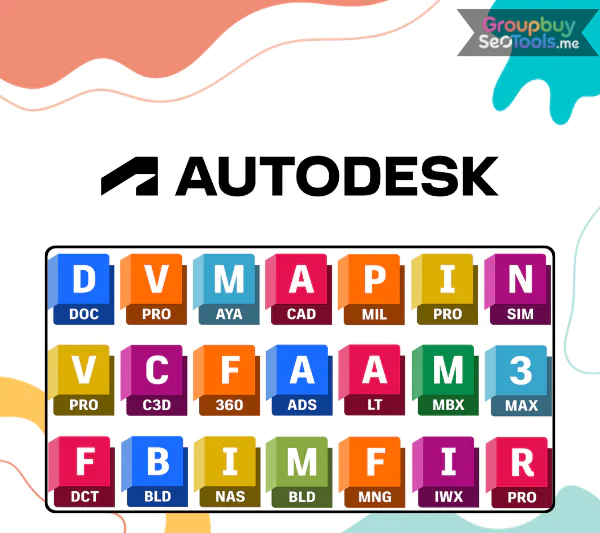
    Overview of Autodesk All Apps showing popular software like AutoCAD, Revit, Maya, and 3ds Max in one subscription

    With Autodesk All Apps, you don’t have to worry about getting and handling separate licenses. Everything you need is in one easy-to-use service, which saves you time and money and makes your work easier. Autodesk is a global leader in design software that was founded in the US in 1982. This solution is the result of decades of innovation, beginning with the famous AutoCAD and continuing with new tools for architecture, engineering, manufacturing, and digital entertainment. This makes for a flexible space where imagination can grow without being stifled.

    What products are included in Autodesk All Apps?

    Below is a list of applications users can access, along with their primary functions:

    SoftwareMain Function
    Autodesk AutoCAD2D and 3D CAD drafting and design
    Autodesk AutoCAD LT2D CAD drafting and design
    Autodesk RevitBuilding Information Modeling (BIM)
    Autodesk 3ds Max3D modeling, animation, game asset creation, and design visualization
    Autodesk Maya3D modeling and animation for film, games, and television
    Autodesk Fusion 360Cloud-based 3D CAD / CAM / CAE product design
    Autodesk Civil 3DCivil engineering design and construction documentation
    Autodesk InventorProfessional 3D mechanical design software with advanced engineering tools
    Autodesk Inventor LTAdds 3D mechanical CAD capabilities to 2D workflows
    Autodesk ArnoldHigh-performance rendering for high-quality visual content
    Autodesk CFD UltimateComputational fluid dynamics and thermal simulation software
    Autodesk FlameProfessional video editing and digital compositing software
    Autodesk Formit3D modeling tool for architects to visualize design concepts from the earliest stages
    Autodesk Formit ProAdvanced version of Autodesk Formit with enhanced features for complex design projects
    Autodesk Maya LTLightweight version of Autodesk Maya for game designers and 3D visualization
    Autodesk Inventor ProfessionalPremium version of Inventor with advanced mechanical design and simulation features
    Autodesk Advance SteelSteel structure design software for the construction industry
    Autodesk AliasProduct design tools tailored for automotive and industrial designers
    Autodesk InfraWorksInfrastructure design and environmental modeling for construction projects
    Autodesk Mudbox3D sculpting and texture painting software for film and game production
    Autodesk PowerShape3D product and mold design software for manufacturing
    Autodesk SmokeVideo post-production and editing software for film and advertising

    Advantages of Autodesk All Apps

    • Full access to all Autodesk tools: All of Autodesk’s most powerful programs, like AutoCAD, Revit, 3ds Max, Maya, Fusion 360, and more, can be used with a single license. Because of this, it can be used in many fields, including building, engineering, construction, product design, and making digital content.
    • Compared to individual licenses, it saves money: Sometimes it’s much more expensive to buy individual Autodesk programs. The All Apps plan is a better deal overall, especially for businesses, studios, and workers who use a lot of different tools.
    • Always Up to Date: Without having to pay extra, subscribers get the newest software versions, new features, better performance, and important security updates immediately.
    • Integration across applications that works well: Autodesk programs are made to work with each other without any problems. This makes workflows smoother, teamwork easier, and project sharing between teams more effective.
    • Storage in the cloud and official help: The contract gives users access to Autodesk’s official technical support and cloud-based storage, which helps them keep their files safe and quickly fix problems.

    Disadvantages of Autodesk All Apps

    • High Cost of Subscription: The monthly or yearly membership fee is pretty high, so it’s not a good choice for people on a tight budget, like students or freelancers.
    • A steep slope for learning: Autodesk software is strong, but it’s also hard to use. A lot of the time, new users need a lot of time and practice to get good at using the tools.
    • Needs a lot of system resources: A lot of Autodesk programs, especially 3D models and rendering ones, need powerful hardware to work. Some low-end computers might have trouble running them smoothly.
    • Tough management of licenses: Licenses are linked to user accounts, which makes it harder to switch devices or let other people use the same account. This can be a pain for small teams or freelancers who switch computers a lot.

    How Much Does a Licensed Autodesk All Apps Account Cost?

    You can buy or update a real Autodesk All Apps account from GroupbuySeoTools, which is a trustworthy site that you should look into. When it comes to selling software subscriptions and upgrade plans, GroupbuySeoTools specializes in selling real Autodesk accounts at prices that are much lower than normal market prices.

    Right now, you can get a full Autodesk All Apps deal for a low price. With this one subscription, you can use all of Autodesk’s software, including the very famous AutoCAD, without having to pay a lot of money for licenses. Different plans are also available for people who only need one app, like AutoCAD. These plans start at just $15 USD per program per year. It’s a useful and cost-effective way to work with professional-level tools without going over budget.

    Why Choose an Affordable Autodesk All Apps Account from GroupbuySeoTools?

    A lot of workers choose to buy Autodesk All Apps through GroupbuySeoTools for a number of good reasons. Before you choose a long-term software service, here are the main benefits that really matter:

    • Prices that are surprisingly low: with GroupbuySeoToolsYou get access to all of Autodesk’s tools and the whole community of apps at a very low price. This makes professional-level tools much easier for more people to get without lowering the standard.
    • Warranty and help that are easy to understand: Every account comes with clear usage guarantees. During the time of your subscription, you’ll get specialized help to make sure everything runs smoothly and that any problems are fixed quickly.
    • Clear rules for refunds: Making customers happy is important. GroupbuySeoTools has a simple return policy to protect your interests if the service doesn’t meet your needs for good reasons.
    • Stable and trustworthy accounts: Accounts are carefully controlled to make sure they always work, give users access to all features, and cause as few problems as possible while they’re using them.
    • Trusted reputation: GroupbuySeoTools has built up the trust of a big and growing user base over many years of selling licensed software.
    • Dedicated help for customers: The support team is always ready to help, from setting up Autodesk All Apps for the first time to more advanced uses. This is to make sure you get the most out of the software.

    How to Upgrade Autodesk All Apps with GroupbuySeoTools

    We’ll be happy to help you get a real Autodesk All Apps plan at a price you can afford. You can quickly finish the upgrade by following the steps below. Then you can feel confident using the full Autodesk tools.

    • Check out the official website. Go to GroupbuySeoTools and look through the Autodesk All Apps packages that are offered. There are a lot of choices to meet the wants of different people and for different lengths of time.
    • Pick a plan and give details: Pick the plan that works best for you, then fill out the form with the necessary information and pick the way of payment that you prefer.
    • Finish the payment: GroupbuySeoTools lets you pay in a number of different ways, such as through Online Banking and famous e-wallets like MOMO. As soon as your payment goes through, Autodesk will email you your account information within one to two minutes.
    • Check your account: Your login information and step-by-step steps on how to activate and use your Autodesk All Apps subscription will be sent to your email.

    Important usage notes:

    • Device limitation: Each Autodesk All Apps account is intended for use on one device only. Logging in on multiple devices at the same time may result in account suspension.
    • Compliance with usage rules: Please follow Autodesk’s usage policies carefully to avoid violations that could lead to account restrictions without refund.

    Enjoy exploring powerful Autodesk tools with confidence through GroupbuySeoTools.

    Key Steps to Use Autodesk Apps

    Autodesk software is made for professional use in fields like design, engineering, building, construction, and manufacturing. Here are the most important steps you need to take to install, handle, and use Autodesk apps effectively.

    Step 1: Installation and Management

    You can download goods one at a time by logging in to your Autodesk Account, or you can use the Custom Install feature to make a custom installation package. This lets you pick the versions, language packs, and parts that are best for your job.

    Step 2: Managing Updates

    You can see all of your installed goods in one place with the Autodesk Access app (which used to be called the Autodesk Desktop App). You can use this tool to make sure that your software stays stable, secure, and up to date by applying updates, service packs, and hotfixes instantly.

    Step 3: Accessing Installed Applications

    After being set up, Autodesk programs can be started right from the Windows Start menu. The Autodesk App Store is where you can find, install, and control other plugins and add-ons.

    Step 4: Learning and Getting Started

    Autodesk offers Quick Start Guides and built-in tutorials that help you learn faster. These make it easier for both new and experienced users to get started quickly with software interfaces, core tools, and common processes.

    Who Is Autodesk All Apps Designed For?

    • Architects and engineers in general: Tools like AutoCAD, Revit, and Civil 3D are used by construction and architecture professionals to plan, model, and oversee projects of all sizes, from small homes to large infrastructure. BIM processes help make projects more accurate and better overall.
    • For manufacturing and industrial design, programs like Inventor and Fusion 360 make it easier to make products, cut down on production time, and improve the accuracy of designs.
    • 3D artists and animation pros: Maya, 3ds Max, and Mudbox are very useful tools for creative professionals who work in animation, visualization, and media production. They make it possible to make realistic 3D assets for movies, games, and TV shows.
    • To help game makers make immersive and visually appealing games, Autodesk All Apps offers powerful tools like Maya and Arnold for everything from character modeling to animation and rendering.

    Frequently Asked Questions About Autodesk All Apps at GroupbuySeoTools

    1. Which web browsers are supported by the Autodesk App Store?
    For the best experience, use the most recent versions of browsers like Google Chrome, Mozilla Firefox, Microsoft Internet Explorer, and Apple Safari. Older versions might still work, but they might not work as well.

    2. What should I do if I encounter issues with Autodesk applications?
    If you have any issues with your Autodesk software, all you have to do is call the support team at GroupbuySeoTools. The help is given right away. If the problem is with Autodesk, you can also send a message to the official support email that is listed on the product page for the program.

    3. What are the system requirements for Autodesk All Apps?
    To ensure smooth performance, your system should meet the following specifications:

    • Operating system: Windows 10/11 (64-bit) or macOS Monterey and later.
    • Minimum configuration:
      • CPU: Intel Core i5
      • RAM: 8GB
      • Storage: 256GB SSD
      • GPU: GTX 1650
    • Recommended configuration:
      • CPU: Intel Core i7 or i9
      • RAM: 16GB or more
      • Storage: 512GB SSD or higher
      • GPU: RTX 3060 or better

    For program activation and updates, you need to be connected to the internet.We hope that these answers give you the confidence to buy an Autodesk All Apps account from GroupbuySeoTools. Our customer service team is always ready to help if you have more questions.

    Final Thoughts

    You don’t have to buy different software licenses when you have a licensed Autodesk All Apps account from GroupbuySeoTools. You can use all of Autodesk’s professional design and training tools, so you have everything you need to be creative and get work done in one place. Don’t pass up this chance to improve your projects and streamline your work.Check out the full list of Autodesk All Apps tools here.

    Autodesk

    Maya, Arnold, Inventor, All App, Fusion 360, 3DS Max, AutoCAD, MudBox, Civil 3D, Revit, Robot

    Customer Reviews & Feedback

    There are no reviews yet.

    Related products

    Pikbest Premium
    Add to wishlist
    Design Tools cart grey 0

    Pikbest Premium

    Design Tools cart grey 0
    $3.00 – $12.00Price range: $3.00 through $12.00
    Buy cart
    Add to wishlist
    Adobe Creative Cloud
    Add to wishlist
    Design Tools cart grey 0

    Adobe Creative Cloud All Apps – Adobe Full Apps

    Design Tools cart grey 0
    $28.00 – $81.00Price range: $28.00 through $81.00
    Buy cart
    Add to wishlist
    Framer AI
    Add to wishlist
    AI cart grey 0

    Framer AI

    AI cart grey 0
    $66.00
    Buy cart
    Add to wishlist
    UnlimPhotos lifetime
    Add to wishlist
    Design Tools cart grey 0

    UnlimPhotos lifetime

    Design Tools cart grey 0
    $7.00 – $33.00Price range: $7.00 through $33.00
    Buy cart
    Add to wishlist
    Slidegeeks Semi Annual
    Add to wishlist
    Design Tools cart grey 0

    Slidegeeks Semi Annual

    Design Tools cart grey 0
    $7.00 – $17.00Price range: $7.00 through $17.00
    Buy cart
    Add to wishlist
    -89%
    Clipart.com 2 Year
    Add to wishlist
    Design Tools cart grey 0

    Clipart.com 2 Year

    Design Tools cart grey 0
    $245.00 Original price was: $245.00.$28.00Current price is: $28.00.
    Buy cart
    Add to wishlist
    Product categories
    • Ad Spy
    • AI
      • AI All-in-One
      • AI Audio
      • AI Chat Bot
      • AI Dev Tools
      • AI Images
      • AI Video
    • Audio Tools
    • Cloud & Storage
      • VPNs
    • Content Tools
    • Design Tools
    • Ecom Tools
    • Edu Tools
    • Others
    • Relax Tools
    • SEO Tools
    • Stocks
    Latest Products
    • Adspy Push Adspy Push $150.00
    • Adspy Desktop Adspy Desktop $200.00
    • BrightLocal SEO BrightLocal SEO $85.00
    • Scrollpop AI Scrollpop AI $67.00
    • Rankd SEO Rankd SEO $5.00 – $30.00Price range: $5.00 through $30.00

    GroupbuySeoTools.me | best seo tools group buy at cheap price.

    Address : 11/777, Braf Hmadelkahoi Rd, Princess Dock, Mumbai Port Trust, Mazgaon, Mumbai, Maharashtra 400009, India

    instagram
    About Us
    Contact Us
    News
    FAQ
    Affiliate
    Privacy Policy
    Terms of Use
    AML Policy
    DMCA Policy
    Refund Policy
    Copyright Policy
    DMCA
    GDPR Notice

    Visa
    PayPal
    Stripe
    MasterCard
    Cash On Delivery

    Copyright 2026 © GroupbuySeoTools.me. All Rights Reserved.

    Visa
    PayPal
    Stripe
    MasterCard
    Cash On Delivery
    Copyright 2026 © GroupbuyseoTools.me
    • AI All-in-One
      • Ecom Tools
        • Contact
      • Others
        • AML Policy
    • AI
    • AI Audio
      • Ecom Tools
    • AI Dev Tools
    • Ad Spy
    • Login
    • Newsletter

    Login

    Login with your Social ID

    Lost your password?