AI All-in-One
 Ecom Tools
 Others
 AI
AI AI Audio
 AI Dev Tools
 Cloud & Storage
 Edu Tools
 Relax Tools
 Ecom Tools
CreativeOS
$100.00

$100.00

Sent via customer’s email

12-24hrs

All-in-one Subscription
CreativeOS offers thousands of high-quality templates to help you develop ideas, realize and deploy campaigns in just a few clicks
Official website: https://creativeos.com/
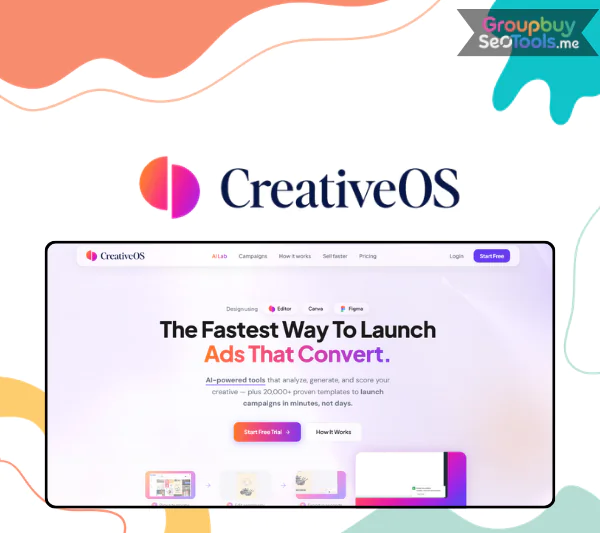 CreativeOS is an AI powered platform of more than 20,000 marketing templates for ads, emails, and landing pages, built to help performance marketers ship better creatives faster without relying on a full design team. It first hit the radar of many DTC operators through AppSumo and high performing ad campaigns, and by 2026 it has become one of the most talked about creative tools in the performance marketing space.
The marketers who land on this guide share a familiar set of pains: blank canvas syndrome that kills momentum, slow creative production that strangles testing velocity, inconsistent branding across channels, and weak CTR and ROAS that quietly point at creative as the real bottleneck.
This guide is written for DTC brands, agencies, freelancers, and solopreneurs who want an honest answer to one question: is CreativeOS the tool that finally fixes my creative pipeline in 2026? Backed by more than 10 years of reviewing marketing SaaS, this is a non sponsored, people first review.
Here is what we will cover:
First, let us define exactly what CreativeOS is and what you can do with it.

CreativeOS is a browser based, AI powered platform that gives marketers access to a curated library of more than 20,000 templates for ads, emails, and landing pages, complete with built in editing, brand kit management, AI creative scoring, and one click variant generation. It is designed for marketers, not designers, which means no Figma skills, no Adobe knowledge, and no design background are required to produce conversion oriented creatives at scale.
The platform’s core promise is that you can launch campaigns in minutes instead of hours. Every template is built around proven layouts that have actually been used in real ad spend across more than 100 industries, from DTC fashion and beauty to SaaS, coaching, fitness, and home goods. Outputs include static social ads for TikTok, Facebook, and Instagram, carousel creatives, email headers and hero blocks, promo banners, and landing page sections.
At a glance, here is what CreativeOS is in 2026:

The CreativeOS library is the heart of the product. It contains more than 20,000 templates explicitly designed for performance marketing, not generic design. Inside you will find static ad images for every major platform, carousel creatives, email headers and offer graphics, landing page hero blocks, social posts, and seasonal promo creatives.
What makes the library practical is the filtering system. You can drill into the exact subset that matches your campaign with a few clicks: by platform such as TikTok, Facebook, Instagram, Pinterest, display, and email; by funnel stage such as awareness, consideration, and retargeting; by industry such as DTC fashion, beauty, SaaS, fitness, home, and coaching; and by format such as UGC style, product focused, testimonial, or offer driven.
| Filter Type | Example Options | Why It Matters for Marketers |
| Platform | TikTok, FB, IG, Google | Correct size and layout for every placement |
| Industry | Beauty, fitness, SaaS, DTC | Aligns with proven creative angles |
| Goal | Lead gen, sales, UGC | Faster match to campaign objectives |
| Funnel stage | Awareness, retargeting | Right message for the right audience |
A typical search might look like TikTok, DTC fashion, retargeting, discount offer. Within seconds, the library narrows from 20,000 to a focused shortlist of templates engineered for that exact moment in the funnel. Once you have chosen a template, you customize everything directly in your browser.
The CreativeOS editor lives entirely in your browser, with no installations, no licenses, and no waiting for a designer. The interface follows a familiar canvas based layout with layers, smart guides, and dedicated sidebars for text, colors, images, and reusable visual elements.
Core editing actions are deliberately simple. You can edit copy, fonts, colors, and spacing without breaking the underlying layout, swap product images, add icons and badges, duplicate any creative to spin up a variant in seconds, and rely on undo, redo, autosave, and version history.
A realistic flow: pick a “50 percent off retargeting” template, apply your brand colors, swap the placeholder image for a real product shot, and update the headline to your live offer. Total time is a few minutes, not the half day a custom design would consume.
Brand kits are the secret weapon for agencies and multi brand operators. A brand kit holds everything that defines a visual identity in one organized place: primary and secondary brand colors, multiple logo variations for different backgrounds, typography sets for headlines and body, and reusable visual elements such as badges and frames.
Applying a brand kit to any template is a one click operation. The system re skins fonts, colors, and logos across the entire creative without you touching individual layers. For an agency managing 10 clients, that means switching between brand identities with the same speed as switching tabs in a browser.
Consistent branding across every ad, email, and landing page also improves recognition and trust, both of which tend to push click through rates up over time. Once your creatives look on brand, the next question is whether they will perform, which is where the AI layer earns its keep.
The AI inside CreativeOS is what separates it from a glorified template library. Instead of guessing whether a creative will perform, you can score it before spending a cent on traffic. The AI analyzes layout patterns, text density, color contrast, hierarchy, and CTA visibility, then produces a creative score along with actionable suggestions.
| AI Feature | What It Analyzes | How Marketers Use It |
| Creative score | Layout, text, hierarchy | Pick top variants to test first |
| Suggestions | Headlines, CTA, contrast | Quick fixes before launching |
| Variant generator | Headline and offer combinations | Build a test set without new designs |
A common example: the AI flags weak contrast on your CTA and produces a fixed variant. Another: it identifies that your headline is fighting your product shot for attention and recommends a cleaner hierarchy. None of this replaces marketer judgment, but it stops you from launching obvious mistakes. Best practice is to use the score as a prioritization tool, then test the strongest two or three variants in your real ad account.
CreativeOS is designed to plug into the tools you already use rather than lock you in. Export formats include PNG, JPG, SVG, and PDF, with resolution presets sized for every major placement such as Stories, Reels, Feed, Square, Vertical, Display, and email friendly sizes.
Destinations are flexible. You can download to your machine in the exact size you need, hand off into Canva or Figma for designer level refinement, or prepare assets for Meta Ads Manager, TikTok Ads Manager, and Google Ads. A typical real world flow: a performance marketer produces five static creatives in CreativeOS, exports them as Meta ready PNGs, and uploads them directly into Ads Manager the same hour. Now that you know the building blocks, let us walk through the full workflow.
Every great creative starts with a clear job to do. Before opening the library, decide your campaign goal: awareness, lead generation, sales, or retargeting. Then choose your platforms, whether TikTok, Facebook, Instagram, email, or a landing page. Finally, sketch the audience nuance that matters, such as age, interest, and creative angle. These inputs shape every CreativeOS suggestion that follows. A retargeting campaign for a DTC skincare brand chasing abandoned carts pulls a different shortlist than a top of funnel awareness push.
In the library, use filters and search together to shortlist five to ten templates that match your goal, platform, and offer. Each template includes context: the original use case, the offer style, and the visual approach. Check that the layout matches your funnel stage, the text density fits the message you want to deliver, and the visual style feels right for your brand once recolored. Save favorites into collections; over time, your saved set becomes a personalized library of proven starting points.
Apply your brand kit to instantly re skin the template with your colors, fonts, and logo. Then rewrite the placeholder text into your real hook, supporting body, and call to action. Swap generic imagery for your actual product shots, UGC photos, or lifestyle images. Throughout this process, keep visual hierarchy clean. A small but powerful example: convert a generic “Big Sale” template into “24 Hour Vitamin C Flash Sale, Free Shipping Today,” and the same layout suddenly carries a specific, time bound offer that converts in the real world.
Run AI scoring on your core creative and read the recommendations carefully. Prioritize the suggestions with the biggest impact, usually contrast, clarity, and CTA visibility. Then use the variant generator to spin up multiple versions with different headlines, offers, layouts, or color treatments. A practical decision rule keeps testing tight: only ship variants that score above your threshold or that fix a critical issue flagged by the AI. Aim for three to five variants per ad set, no more.
Export your creatives in the correct formats and sizes, upload them into your ad platforms or hand them to your media buyer, and launch. Then watch the metrics that pay your bills: CTR, CPC, ROAS, and conversion rate. The most important step happens after the data lands. Feed your learnings back into CreativeOS by favoring the templates, styles, and messages that performed. If template A outperforms template B by 30 percent on CTR after seven days, your next cycle explores variations of A. Over a few cycles, this feedback loop compounds into a creative system that gets better every month.
DTC brands are arguably the heaviest users of CreativeOS, and for good reason. The model demands constant creative refresh, frequent product launches, seasonal promos, and tight integration of UGC into paid traffic. Templates exist for every major campaign type, from launch announcements and restock alerts to flash sales, bundle promos, and testimonial proofs. Variant generation lets you run real creative testing across Meta and TikTok without burning out your designer. A mid sized apparel brand can move from five creatives per month to more than 30 with the same team, and operator testimonials frequently mention 2 to 3 times ROAS lifts after a serious creative refresh.
Agencies live or die by creative throughput. Separate brand kits per client let an account manager switch between identities in one click. Reusable campaign frameworks, such as a launch campaign set or an evergreen retargeting set, package recurring deliverables. Junior staff and virtual assistants can produce solid drafts from templates, freeing senior designers for the work that truly needs craft. An agency producing monthly creative refresh packs for 20 clients across different niches can keep margins healthy without hiring at the rate the workload would normally demand.
Solo founders and creators face the toughest constraints: no designer, limited time, small budget. CreativeOS gives them ready made layouts that simply work, paired with easy text and color edits that make rebranding fast. The confidence factor matters as much as the speed. Knowing that your ads look pro enough to compete in a Facebook feed full of polished brands removes one of the biggest mental blocks to launching. A course creator can build ad creatives, email graphics, and webinar promo images entirely inside CreativeOS in one focused afternoon.
The strongest argument for CreativeOS is that it solves a specific, expensive problem that almost every marketer faces. The biggest advantages cluster around speed, performance focus, and accessibility:
The cumulative effect is hard to overstate. Marketers consistently report that CreativeOS turns creative production from a bottleneck into a multiplier. Aggregated review scores around 4.8 out of 5 on major marketplaces reflect that the experience matches the marketing.
No tool is perfect, and a balanced review needs to flag honest limitations:
A luxury fashion house launching a high end brand identity, for example, still needs a custom design team. CreativeOS is a performance marketing tool, not a brand design studio. To make a final call, it helps to see where it sits versus the obvious alternatives.
Canva is the most common comparison because nearly every marketer has touched it. The honest answer is that the two tools solve different problems.
Canva’s strengths are breadth and accessibility. It offers a massive template range across presentations, documents, social posts, and general design, plus brand kits and a familiar editor at a low entry price. For internal communications, social content, and design at large, it is hard to beat.
CreativeOS focuses tightly on performance marketing. Its templates are built for advertising layouts, not slide decks. The AI layer is explicitly tuned for ad performance. And every template comes from a creative pattern proven in real marketing campaigns, not designed for visual appeal alone.
| Feature | CreativeOS | Canva |
| Main focus | Ad and marketing templates | General design |
| Template type | High converting ad layouts | Social, documents, everything |
| AI scoring | Yes, ad focused | Limited and not ad specific |
| Best for | Performance marketers | General content creation |
The decision rule is simple. If your week is mostly presentations, social content, and ad hoc design, Canva remains the right home base. If your week is dominated by performance ads, email promos, and landing page hero sections, CreativeOS is purpose built for that work.
AI ad generators take a fundamentally different approach. Tools like AdCreative.ai try to generate full ad designs from prompts, drawing on machine learned patterns to produce novel layouts on demand. CreativeOS sits on the other side of the design philosophy spectrum. It is template first, with AI scoring and variant generation layered on top of layouts that humans have already proven in real campaigns.
The trade offs matter. A template first approach offers more predictable, proven structures and greater control over the final creative. A generative AI approach can produce more novel layouts and very high volume output, but often requires more review to identify the real winners. Template first tools tend to be easier for non technical marketers and teams that want consistency. Generative tools can be powerful for high volume experimentation when you have the testing budget to validate ideas.
| Aspect | CreativeOS | AdCreative.ai Style Tools |
| Core approach | Templates plus AI scoring | AI generated layouts from prompts |
| Control | High, you choose the template | Medium, AI drives output |
| Learning source | Proven ad patterns | Model trained general patterns |
| Best fit | Predictable, conversion focused | Experimental, high volume tests |
The choice often comes down to user style. If you want predictable, proven conversion patterns with strong creative control, CreativeOS is the natural choice. If you want experimentation and raw output volume, an AI generator may serve you better. Many sophisticated teams quietly run both, using CreativeOS for the campaign backbone and a generative tool for high volume creative exploration. So, is CreativeOS actually worth it for you in 2026? For most marketers in the situations described above, the answer is yes, with the standard caveat that no tool replaces strategy and testing discipline.
CreativeOS is used for producing performance marketing creatives at scale. Core use cases include static social ad creatives for TikTok, Facebook, and Instagram, email headers and promotional graphics, and landing page hero blocks and sections. The platform is built specifically for marketing outputs that drive measurable results, not general purpose design.
No. CreativeOS complements rather than replaces them. CreativeOS focuses on performance marketing templates with AI scoring, while Canva covers general design and Figma handles deep custom design and design systems. Many teams use CreativeOS for fast ad creation, then export into Canva or Figma when a designer needs to refine the final asset.
CreativeOS typically offers a free trial period so new users can explore the library, test the editor, and run AI scoring on real creatives before committing. The trial usually includes access to a substantial portion of the template library with some limits on advanced features and exports. For the most current trial length and inclusions, always check the official CreativeOS site before signing up.
The primary place to sign up is the official CreativeOS website, which lists current plans, trial details, and feature breakdowns. Lifetime or limited time deals occasionally appear on marketplaces such as AppSumo and partner platforms, which can offer significant savings if you happen to catch them during a promotion. Always confirm current pricing on the official site.
You need almost no design skill, but a basic marketing mindset matters far more. Understanding your target customer, crafting clear hooks, writing strong CTAs, and reading ad metrics like CTR and ROAS are the skills that turn the platform from a template viewer into a real performance engine. If you can write a clear offer, you can produce a strong creative inside CreativeOS.
By using CreativeOS this way, you unlock exactly what it was built for: the ability to ship more high quality, on brand creatives faster, with better odds of performance. Try the trial, build a real campaign set this week, and let the data inside your ad account decide whether it earns a permanent spot in your stack throughout 2026.
There are no reviews yet.