AI All-in-One
 Ecom Tools
 Others
 AI
AI AI Audio
 AI Dev Tools
 Cloud & Storage
 Edu Tools
 Relax Tools
 Ecom Tools
Microsoft Design
$57.70

$57.70

Sent via customer’s email

12-24hrs

All-in-one Subscription
Microsoft Design – Modern AI creative tool developed by Microsoft, supporting users to create professional designs easily.
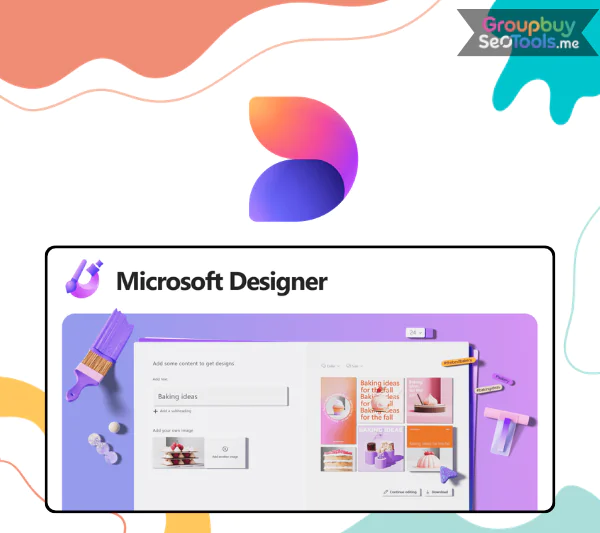 The creative community is buzzing as AI steps into the world of design, and one of the most talked-about names right now is Microsoft Designer. Developed by Microsoft, this platform introduces a whole new approach, helping users transform ideas into professional designs quickly and effortlessly.
Compared to familiar tools like Canva or Adobe Express, Microsoft Designer stands out thanks to its ability to turn just a few lines of text into a collection of elegant, visually appealing, and highly contextual designs. In this article, we’ll dive deep into Microsoft Designer: what it is, how it works, its standout features, and why more and more creators are choosing it.

Microsoft Designer is an AI-powered graphic design application within the Microsoft 365 ecosystem. What sets Designer apart is its combination of AI image generation technology (powered by OpenAI’s DALL·E 2) and a rich library of templates. This allows users to easily create posters, banners, invitations, social media posts, and more within minutes.
The biggest advantage that makes Designer so appealing is its intuitive, easy-to-use interface combined with intelligent automation. Even beginners with no design experience can create professional-quality outputs with just a few drag-and-drop steps.

One of Microsoft Designer’s most powerful features is the ability to transform text prompts into images. For example, simply type: “Design a vintage-style banner for a coffee shop grand opening” and the AI will automatically generate multiple relevant options. Powered by DALL·E 2, the results are sharp, creative, and highly personalized.

No more wasting time searching like on Canva. Designer automatically suggests the right templates based on your description, saving valuable time while still ensuring professional, eye-catching results.
Copilot acts like a “design buddy,” continuously suggesting color palettes, fonts, and layouts to maintain overall harmony. For example, when you add your brand logo, Copilot may suggest adjusting the background or font to match your brand identity.

Although designed for general users, Designer still comes with a strong set of editing tools:
Microsoft Designer is suitable for various purposes:
Users can easily:
If you’re already familiar with PowerPoint, Word, or Excel, Designer is the perfect “missing piece.” Thanks to this integration, all your documents, reports, slides, and marketing campaigns can maintain a consistent, professional look.
Currently, Groupbuyseotools.me offers shared Microsoft Designer accounts at an incredibly affordable price – just $57.7/year. By purchasing through Groupbuyseotools.me, you will get:
If you’re unsure whether to buy directly from Microsoft or via Groupbuyseotools.me, here are compelling reasons to choose the latter:
In fact, after testing all possible methods – buying directly, using free plans, or alternatives – the shared account solution from Groupbuyseotools.me remains the smartest and most cost-effective option for long-term use.
Not everyone needs Designer, but if you fall into the categories below, this tool is definitely worth it:
In short: if you want high-quality visuals without spending too much time, Microsoft Designer is the perfect creative assistant.
The process is super quick and only takes a few steps:
Go to designer.microsoft.com. The tool is currently in preview, and you may need to join a waitlist. Microsoft 365 users will soon have full access.
No need to start from a blank canvas. Simply type in a description, for example: “Design a vintage-style grand opening café poster”. AI will instantly suggest multiple options.
The system will present templates matching your description. Just pick the one you like to customize further.
Once done, you can download the file or share it directly on social media.
Is the account safe?
✔ 100% safe. It’s an official licensed account, updated directly from Microsoft.
Are there any feature limitations?
✔ No. You’ll enjoy full access to all premium features including AI Copilot, templates, stock photos, and editing tools.
What if I forget my password or face login issues?
✔ The support team at Groupbuyseotools.me will immediately help recover your account.
Can I use it on multiple devices?
✔ Yes, it works on PC, laptop, or tablet. However, since this is a shared plan, it’s recommended to log out after use to avoid conflicts.
Do I need a separate Microsoft 365 subscription?
✔ No. The plan from Groupbuyseotools.me already includes full access to Microsoft Designer.
What is Microsoft Designer?
✔ It’s an AI-powered design tool that helps you create social posts, posters, invitations, collages, and more in seconds. Just type an idea, and AI turns it into editable visuals.
Is Microsoft Designer free?
✔ There is a free version for Microsoft accounts. However, to unlock extended limits and premium features, you should upgrade through Microsoft 365 or purchase from Groupbuyseotools.me to save costs.
How is it different from Bing Image Creator?
✔ Designer creates complete designs (including both text + visuals), while Bing Image Creator focuses only on generating images from prompts.
Microsoft Designer is your creative “AI assistant,” transforming any idea into a cohesive design within minutes. From templates and AI-generated images to brand kits, everything works seamlessly, saving you time while ensuring professional results.
Whether you’re a beginner or a professional designer, Microsoft Designer streamlines your workflow, keeps brand style consistent, and elevates the quality of your content.
Sign up today for a licensed Microsoft Designer account at Groupbuyseotools.me for just $57.7/year to unlock all features, save costs, and take your designs to the next level in the AI era.
| Time | 1 Year |
|---|
There are no reviews yet.