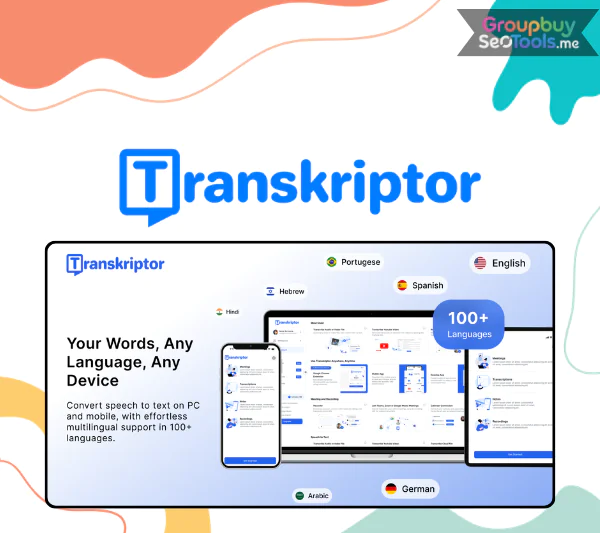
Transkriptoris an AI tool that can accurately turn voice and audio into text up to 99% of the time. If you have a video or audio file saved on your computer, record an online meeting on Zoom, or do a live interview. Transkriptor can quickly recognize and transcribe the whole thing in a matter of seconds.
The cool thing about Transkriptor is that it does more than just “listen and record.” It also understands and analyzes. This tool’s AI can do the following:
Summarize content
Analyze sentiments
Identify individual speakers
Create action items
Build a knowledge base from previous recordings
Transkriptor is like a “second brain” for processing information from speech. It records every exchange as data that can be searched, shared, and used again.
Transkriptor’s outstanding features
Turn speech into text right away in more than 100 languages: You can record right in the browser or upload an MP3, MP4, or WAV file. In a matter of seconds, the whole thing will be shown as text, ready to be changed. As an example: You have a 60-minute English recording of a meeting with a customer. The automatic translation feature gives you a full Vietnamese text in less than two minutes.
99% accuracy and the ability to recognize different speakers: You won’t have to listen to the same thing over and over to figure out who said what. Transkriptor can automatically separate speakers, which is helpful for meetings with a lot of people, news interviews, and seminars.
Integrated notes & comments directly on the transcript: When you work with other people, you can make it easier for them to follow along by adding notes, underlining important parts, or leaving comments. This turns Transkriptor into a tool for working together on content, not just an audio converter.
Connecting to other platforms without any problems: Zapier makes it easy for Transkriptor to sync with Google Drive, Dropbox, OneDrive, Zoom, or CRM. You can set Transkriptor to copy all of your recordings automatically, and you’ll get transcripts right in your Drive folder. You don’t have to do anything else.
Allows video subtitling and exporting of multiple files: The function that makes subtitles automatically is great for people who teach online, make videos, or use YouTube. Transkriptor lets you export files in SRT, TXT, or DOCX formats. This makes your movies easier for people who are deaf or hard of hearing to understand and for people all over the world.
AI information base—it’s simple to store and find things: The transcripts are all kept in the cloud and can be quickly searched by tag, keyword, or theme. Just type “Q3 report,” and Transkriptor will get rid of all the meeting transcripts that aren’t connected. This is the part that lawyers, advisers, and reporters love.
Security for businesses: International safety standards like GDPR, ISO 27001, SOC 2, and SSL protection are met by Transkriptor. This makes sure that all private data is always safe, like medical records, contracts, customer information, etc.
Where to buy cheap Transkriptor accounts?
Our store, GroupbuySeoTools, is currently selling real Transkriptor account packages at a “cheap” price, making them good for individuals and workgroups that want to save money.
The unique thing about this account is that it is shared, but it still has all the benefits and features of the paid version. We sell more than just accounts; we sell better ways to work. If you buy the new Transkriptor deal at GroupbuySeoTools, you will get:
Collaborative Workspaces: A place where teams can work together and share files and take notes.
Knowledge Base: A database of information that makes it easier to find all the recordings that have been made.
Call Analysis: This includes the length of time each person talks, AI filtering, and tracking of emotions.
Advanced Analytics: Advanced statistics to keep track of recordings and judge their worth.
Centralized Billing: Groups and businesses can easily handle their bills from one place.
Roles and Permissions for Users: Permissions for users, data security.
Custom Bot Name and picture: When you join a meeting, you can change your bot’s name and picture.
Summary emails that can be changed: You can change summary emails to fit your brand and the way you talk to people.
In short, you’ll have everything a professional group needs to work with audio and video and get info from them.
Transkriptor Price List
Why should you choose to upgrade your Transkriptor account at GroupbuySeoTools?
There are 5 main reasons why customers stick with us:
Price is 5 – 10 times cheaper than buying directly on the Transkriptor website.
Commitment to genuine copyright – No crack, no worries about warranty risks secret.
Shared account but stable operation, optimized to limit user conflicts.
Fast technical support via Zalo, Telegram, email.
Warranty during the entire period of use – Errors are replaced immediately, no waiting time.
We know that steadiness and safety are very important when using tools like Transkriptor. Because of this, every account that is sold has been carefully checked and set up properly, so you can log in and start using it right away.
Who is a Transkriptor account for?
Students, lecturers – Record lectures, translate, subtitle learning videos.
Journalists, reporters – Quickly convert interviews and press conferences into text.
Content Creator, YouTuber, TikToker – Create subtitles, translate videos, optimize content to reach more people.
Small and medium-sized businesses – Manage knowledge, team meetings, train employees.
Freelancers – Optimize working time, deliver products faster to customers.
In general, anyone who is working with audio or video files can take advantage of the power of Transkriptor.
Some frequently asked questions about Transkriptor accounts at GroupbuySeoTools
Q1: Are there any limited features when buying together? → No. You can still use all the features as a paid account purchased directly from Transkriptor.
Q2: Will you lose data when using together? → No, because each person will have their own workspace to store. We always guide you to set up your personal workspace when activating.
Q3: What if the account has problems? → We will process and change to a new account within 12 hours.
Q4: Can I use it on my phone and computer at the same time? → Absolutely. Transkriptor supports web, iOS and Android.
Q5: Can I cancel my renewal at any time? → Yes. You just need to notify 3 days before the end of the billing cycle.
Conclusion
We think that Transkriptor is a tool that changes how we read and understand words. When you add GroupbuySeoTools cheap group purchase service to the mix, you have an option that works well and doesn’t cost a lot.
Transkriptor is a great tool to have if you want to start a trend, make money from digital content, or just get more done. So why not let GroupbuySeoTools help you get real copyrights at a much lower cost instead of paying a lot of money to buy them directly?
 AI All-in-One
 Ecom Tools
 Others
 AI
AI AI Audio
 AI Dev Tools
 Cloud & Storage
 Edu Tools
 Relax Tools
 Ecom Tools