Google
 Microsoft
 Adobe
Adobe Canva
Canva Kaspersky
-62%
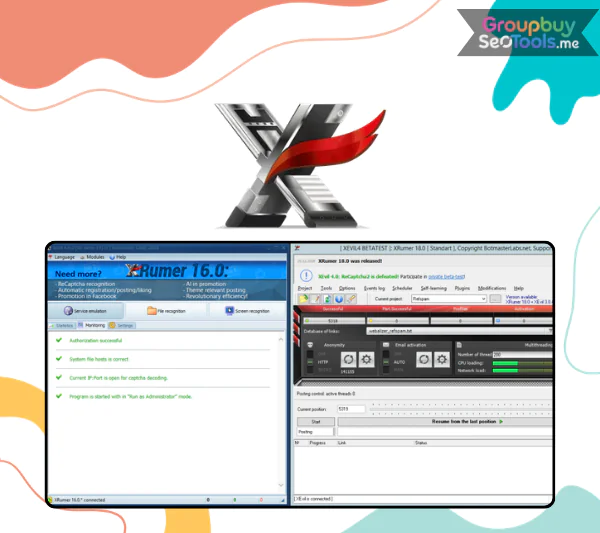
XRumer + XEvil + All Plugins
Original price was: $520.00.$196.00Current price is: $196.00.

Original price was: $520.00.$196.00Current price is: $196.00.
Sent via customer’s email
12-24hrs
All-in-one Subscription
XRumer — multi-functional tool for promotion in different ways on Internet
XRumer Automation Suite: OverviewFor marketers who work with a lot of clients, promoting things by hand quickly stops working well. The XRumer platform is a powerful automation tool made to make large-scale online marketing jobs easier, like posting on forums, building links, and making accounts. With an integrated system, users can handle many tasks so they don’t have to spend hours doing the same things over and over again.
XRumer comes with a number of add-ons, like XEvil, Hrefer, SocPlugin, and BlogsPlugin, that make it work better on search engines, blogs, and social networks. When used together, these tools give SEO experts and digital marketers a complete automation setting.
These days, a lot of people choose to use GroupbuySeoTools to get to these tools. This website lets multiple people share access to expensive marketing software at a lower price than buying separate licenses.
It has a strong system that can find and get around many kinds of graphical verification problems. The software can easily handle hundreds of popular captcha formats used on social networks, websites, and forums during the registration or posting process.
Not only that, but it also works with text-based verification questions like easy math or knowledge prompts. The built-in database of answers has more than 170,000 entries, and math problems are solved instantly when the question is sent in.
With extra apps, this tool can automatically post on a number of popular social networks. The software can post messages, leave comments on media, share photos or videos, and invite other users or groups.
With these automation features, marketers can contact more people without having to do the same tasks over and over again.
The smart posting system in XRumer makes sure that messages are appropriate for the site or platform they are meant for. Instead of sending out random content, the system tries to match messages with the right conversation categories.
This method keeps people more interested and makes it less likely that posts will be marked as spam.
XEvil is a special module that makes it easier for XRumer to break captcha images. The software was made with cutting-edge OCR technology, which makes automation more accurate when working with current verification systems.
Hrefer is made to parse search engine results and get big groups of URLs. This lets SEO experts make lists of specific websites that they can use for efforts to reach out to people or build links.
The SocPlugin adds support for social media sites to XRumer. It lets people handle multiple accounts and set up automatic responses on sites like Facebook, VKontakte, Odnoklassniki, and Mamba.
BlogsPlugin focuses on automating tasks on popular blogging platforms commonly used for Web 2.0 marketing strategies.
Step 1: Install the Software
Get XRumer and put it on your computer. Set up the basic settings, like proxy lists, captcha modules, and writing templates, after installation.
Step 2: Prepare Target Databases
If you want to spread your content on forums, blogs, or social networks, use Hrefer or another tool to find lists of those sites.
Step 3: Configure Campaign Settings
Set up your campaign by choosing when to post notes, links, account information, and other things.
Step 4: Run Automated Campaigns
Once everything is set up, start the campaign and let the system create accounts, make posts, and do other advertising tasks on its own.
For people or small businesses, the legal license cost of advanced automation tools can be high. To cut costs, a lot of marketers use group-buy sites for this reason.
People believe GroupbuySeoTools, a website that lets people share subscriptions to premium SEO and marketing software. This lets people use skilled tools without having to pay the full price.
With XRumer and its companion tools, digital marketing and SEO promotion can be done automatically in a very strong way. With advanced features like recognizing captchas, automatic posting, search engine parsing, and social media interaction, the system makes it easy for marketers to run large-scale campaigns.
Users who want to get these tools for a more fair price can use GroupbuySeoTools to get premium automation software without having to pay the full official license price.
There are no reviews yet.