Most people don’t need a PDF editor. They need to do one specific thing with a PDF — merge two files, shrink a document before emailing it, turn a scanned page into editable text, sign something without printing it. Then they move on.
The problem is that most PDF tools are built for the 5% of users who need everything, and they price accordingly. Adobe Acrobat charges $23 a month. Free alternatives nickel-and-dime you on file sizes, batch limits, or the exact feature you need most.
iLovePDF takes a different approach: 25+ tools, all in a browser, most of them free, with no account required to get started. This guide breaks down exactly what’s available, what it costs, and whether it’s worth using.
What is iLovePDF?
iLovePDF launched in Barcelona as the sister product of iLoveIMG, built around a single premise: working with PDFs shouldn’t require expensive software or a steep learning curve.
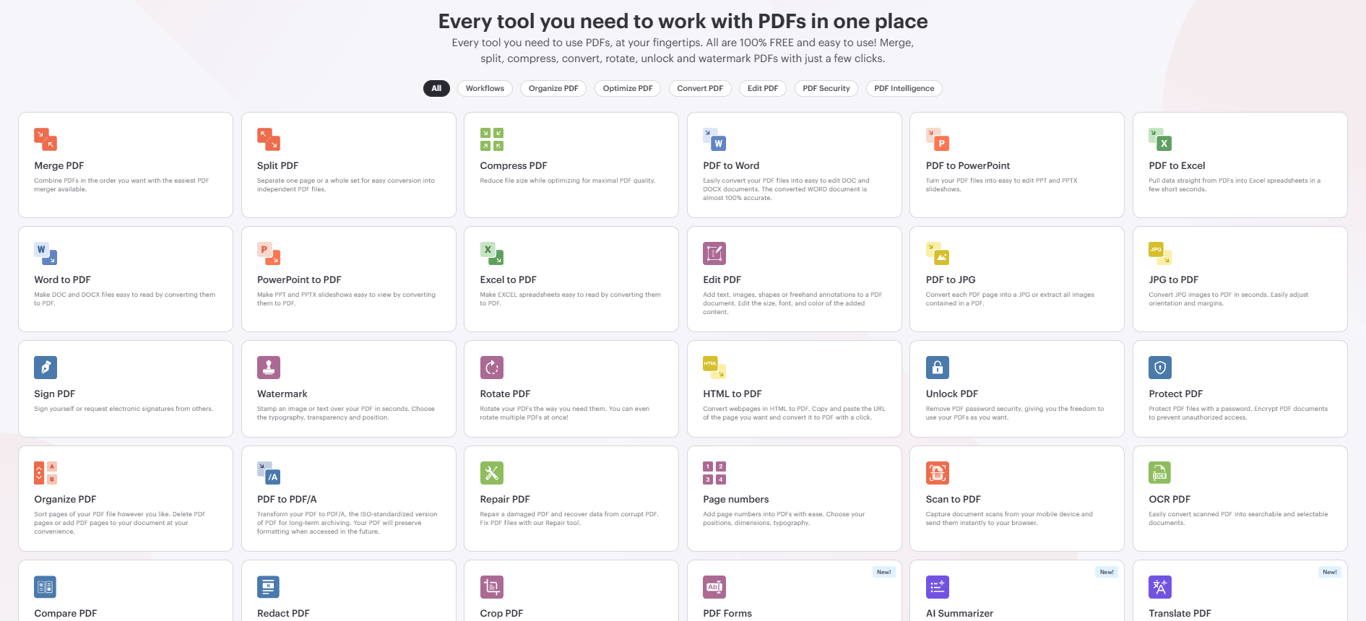
The result is a platform that now handles tens of millions of documents monthly across more than 25 languages, serving everyone from individual users to global enterprises and public institutions. Tools span the full PDF lifecycle — from basic organization and compression to AI-powered summarization and multilingual translation.
What makes it different from most free PDF tools:
Three things stand out. First, the sheer number of tools available for free — 25+, compared to the 5–10 that most free platforms offer before hitting a paywall. Second, the fact that no account is required to use core tools; most competitors force registration before delivering results. Third, security: files are encrypted during processing and automatically deleted from servers after completion — not stored, not mined, not used for anything else.
The freemium structure is transparent. Core tools are genuinely free. Premium at $4/month (billed annually) unlocks OCR, digital signatures, AI tools, unlimited processing, and an ad-free experience. Business plans cover teams of 25 or more.
Full Tool List of iLovePDF
Organize
- Merge PDF Combine multiple PDFs into a single document. Drag and drop to set the order before merging. The most-used tool on the platform — and the one with the highest user satisfaction scores.
- Split PDF Break a PDF apart by page range or extract every page as its own file. Useful for large contracts, reports, or books that need to be divided into usable sections.
- Remove Pages Delete specific pages or ranges without rebuilding the document from scratch.
- Extract Pages Pull selected pages into a new standalone file while keeping the original intact.
- Organize PDF Visual drag-and-drop interface for reordering, adding, and removing pages — full structural control over any document.
- Scan to PDF Convert documents photographed with a phone camera or flatbed scanner into organized PDF files.
Optimize
- Compress PDF Reduce file size while preserving visual quality — suitable for email, web upload, and archiving. Most effective on text-heavy documents; PDFs packed with high-resolution images may see smaller size reductions.
- Repair PDF Recover content from damaged or corrupt files that other tools can’t open.
- OCR PDF (Premium) Converts scanned, image-based PDFs into fully searchable, selectable text. Frequently the single reason users upgrade to Premium — it transforms static scans of documents into live, editable content.
Convert to PDF
- Word to PDF — DOC and DOCX to PDF with formatting preserved.
- PowerPoint to PDF — PPT and PPTX to PDF, layout and visuals intact.
- Excel to PDF — XLS and XLSX to PDF with table structure maintained.
- JPG to PDF — Single or multiple images to PDF, with orientation and margin controls.
- HTML to PDF — Paste any URL, convert the page to PDF instantly. Useful for archiving web content or capturing HTML-based reports as static documents.
Convert from PDF
- PDF to Word iLovePDF’s most-praised conversion. Users consistently describe results as near-100% accurate for text-based PDFs — suitable for professional and client-facing use. Quality varies for scanned PDFs not run through OCR first, or documents with highly complex layouts.
- PDF to PowerPoint — Extract PDF content into an editable slide deck.
- PDF to Excel — Pull structured data from PDFs into spreadsheets. Particularly useful for financial reports, invoices, and data tables requiring further analysis.
- PDF to JPG — Convert each page to a JPG image, or extract all embedded images individually.
- PDF to PDF/A — Convert to ISO-standardized PDF/A format for long-term archiving and regulatory compliance.
Edit
- Edit PDF — Add text, images, shapes, and freehand annotations. Adjust font, size, and color of added elements. Best for adding new content to existing PDFs; modifying pre-existing text within the document has limitations — users needing heavy revision of existing content may find this constraining.
- Rotate PDF — Rotate individual pages or full documents. Supports batch rotation across multiple files.
- Add Page Numbers — Insert formatted page numbers with control over position and style.
- Add Watermark — Overlay text or image watermarks across all pages or specific ones, with transparency and positioning options.
- Crop PDF — Trim white borders, adjust visible page area, or standardize dimensions across a document.
- PDF Forms — Fill interactive form fields in the browser, or create new fillable fields within existing PDFs.
Security
- Protect PDF — Encrypt with a password. Set permissions for printing, copying, and editing independently.
- Unlock PDF — Remove password protection from files you own. Requires knowing the current password.
- Sign PDF — Self-sign or request signatures from others via shareable link or QR code. Supports signing multiple documents at once. Consistently rated as one of the platform’s most convenient and reliable tools.
- Redact PDF — Permanently remove sensitive information — names, identifiers, financial data — before sharing. Permanent and irreversible.
- Compare PDF — Side-by-side comparison of two document versions to surface differences, additions, and deletions.
AI Tools
- AI Summarizer Upload a PDF and receive an AI-generated summary of its key content. Built for long reports, research papers, legal documents, and any file where identifying the most important information quickly matters more than reading everything.
- Translate PDF AI-powered translation that converts PDF content between languages while preserving document structure and formatting. Wide language pair support — useful for international business, academic research, and cross-language document workflows.
Standout Features – iLovePDF
No Account, No Barrier
Core tools work without registration. This is less common than it sounds — most free PDF platforms require an account before delivering processed files. On iLovePDF, you can merge, compress, convert, and download in under a minute with zero setup.
Privacy Built Into the Default
Every file is encrypted in transit via HTTPS and automatically deleted from iLovePDF’s servers after processing. There’s no opt-in required, no settings to configure. Sensitive documents simply don’t persist on third-party infrastructure any longer than the task requires.
Cloud Integration That Actually Saves Time
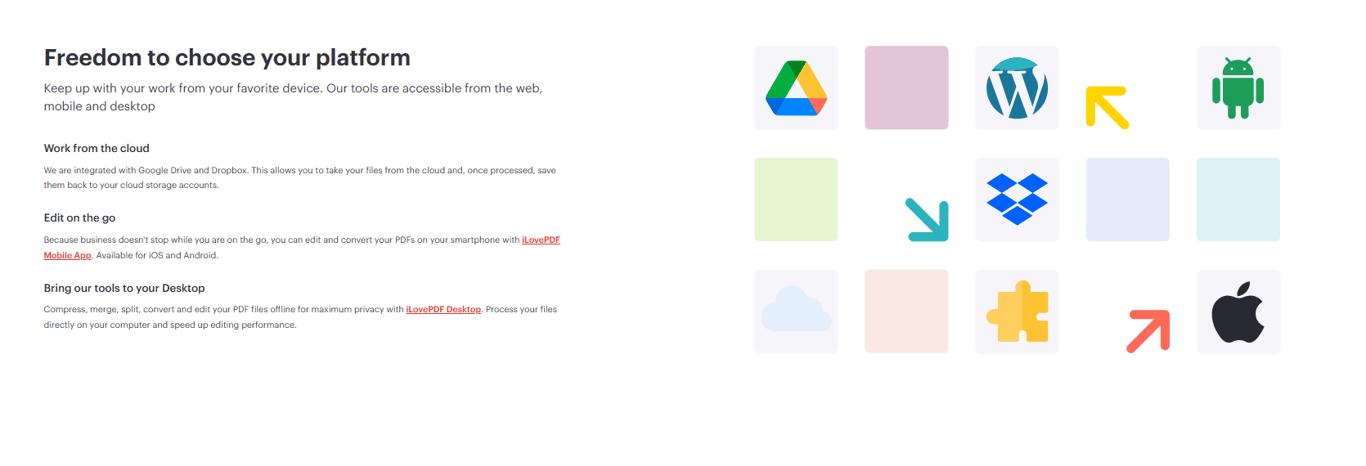
Import files directly from Google Drive or Dropbox. Save results back to cloud storage without downloading locally first. For anyone working across devices or managing documents in cloud-first environments, this removes a friction point that adds up fast over repeated use.
AI That Goes Beyond Basic Processing
The AI Summarizer and Translate PDF tools extend the platform into territory most PDF tools haven’t reached. Getting a structured summary of a 40-page legal document or translating a business contract into another language — tasks that previously required separate tools or manual effort — are now part of the same workflow.
Cross-Platform on Premium
Premium subscribers access the full platform across web, Mac, Windows, iOS, and Android. The desktop app offers free PDF reading; editing and processing require Premium. The mobile app delivers the full experience on phones and tablets.
Developer Access via iLoveAPI
REST API with HTTPS SSL (SHA256 encryption), JWT authentication, 99.9%+ uptime, and official libraries for PHP, .NET, Ruby, and Node.js. Covers all platform tools programmatically — merge, split, compress, convert, OCR, sign, and more.
Integration with Existing Workflows
Connects with Google Drive, Dropbox, Microsoft PowerPoint, Microsoft Excel, Zapier, Make (formerly Integromat), and WordPress — plugging into the tools most teams already use rather than forcing a workflow change.
Pricing & Plans of iLovePDF
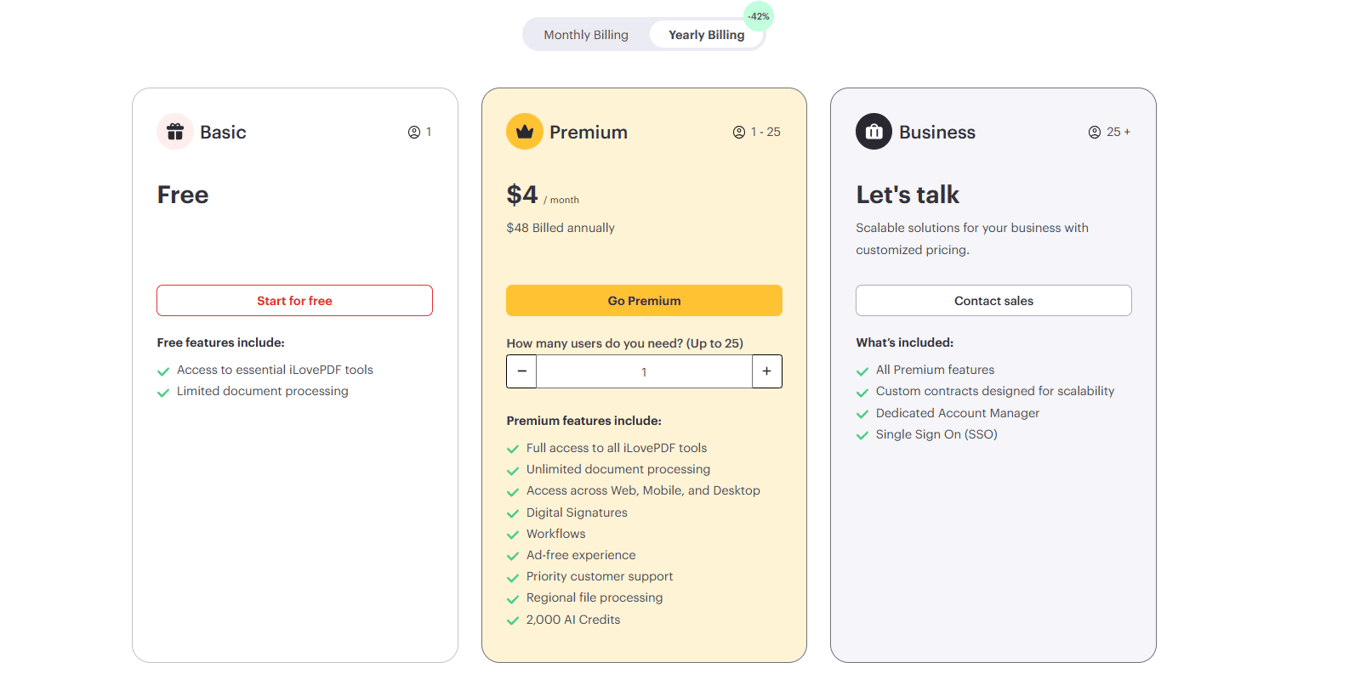
| Feature |
Basic |
Premium |
Business |
| Users |
1 |
1–25 |
25+ |
| Price |
Free |
$4/month
$48 billed annually |
Let’s talk |
| Get Started |
Start for free |
Go Premium |
Contact Sales |
| Access to essential iLovePDF tools |
✓ |
✓ |
✓ |
| Limited document processing |
✓ |
✗ |
✗ |
| Unlimited document processing |
✗ |
✓ |
✓ |
| Access across Web, Mobile, and Desktop |
✗ |
✓ |
✓ |
| Digital Signatures |
✗ |
✓ |
✓ |
| Workflows |
✗ |
✓ |
✓ |
| Ad-free experience |
✗ |
✓ |
✓ |
| Priority customer support |
✗ |
✓ |
✓ |
| Regional file processing |
✗ |
✓ |
✓ |
| AI Credits |
✗ |
2,000 AI Credits |
Included (customized plan) |
| Custom contracts designed for scalability |
✗ |
✗ |
✓ |
| Dedicated Account Manager |
✗ |
✗ |
✓ |
| Single Sign-On (SSO) |
✗ |
✗ |
✓ |
Honest Pros & Cons
What Works Well
- Tool coverage is unmatched at this price point. 25+ tools covering every stage of a PDF workflow — organize, optimize, convert, edit, secure, sign, and AI-analyze — is more than most paid competitors offer, let alone free ones.
- The PDF to Word conversion holds up professionally. This matters because it’s the conversion most people care about. Users across professional contexts consistently rate the output as near-100% accurate and suitable for client-facing work — the bar that matters in real use.
- Signing workflows are genuinely convenient. Self-signing, inviting others via link or QR code, batch signing multiple documents — this covers most e-signature scenarios without a dedicated tool or additional cost.
- AI tools add real value. The Summarizer and Translate PDF aren’t token features. They’re useful additions for users who work with long documents or multilingual content regularly.
- Privacy defaults are strong. Auto-deletion plus HTTPS encryption as defaults — not options — makes the platform appropriate for sensitive documents without requiring configuration.
- Pricing is hard to argue with. $4/month for unlimited processing, OCR, AI tools, and digital signatures, with a 42% student discount available, is competitive against every alternative in the category.
Where It Falls Short
- OCR requires payment. The tool most users discover they urgently need — for converting scanned documents to searchable text — is locked behind Premium. PDF24 offers free OCR if that’s your primary use case and you don’t need anything else.
- Editing existing PDF text is limited. iLovePDF handles adding new content well. Modifying text that already exists within a PDF is a different matter — the editing tool has real constraints here. For heavy in-document editing, Adobe Acrobat remains the professional standard.
- Image-heavy PDF compression may underdeliver. The compression tool performs best on text-heavy documents. PDFs dense with high-resolution images may not see the file size reductions users expect.
- Desktop app requires Premium for processing. The free desktop version is essentially a PDF reader. Full tool access on desktop means paying.
- No offline mode. Everything requires an internet connection. Not a dealbreaker for most users, but worth knowing.
Head-to-Head Comparisons
iLovePDF vs Adobe Acrobat
Adobe Acrobat is the professional standard — unmatched for in-document text editing, complex interactive forms, and publishing-grade PDF work. At $23/month, it’s also the most expensive option by far.
iLovePDF covers the vast majority of everyday PDF needs at a fraction of that cost. The gap shows when you need to modify existing text within a PDF document — Acrobat handles this better. For everything else — converting, compressing, organizing, signing, and now AI-analyzing — iLovePDF is the more practical choice for individuals and small businesses.
- Use Adobe Acrobat when: Advanced in-document editing, complex form creation, or professional publishing is a regular requirement and the price is justified.
- Use iLovePDF when: You need reliable, broad-coverage PDF processing without a $23/month commitment.
iLovePDF vs Smallpdf
The closest direct competitor. Both platforms cover similar tool sets; Smallpdf’s interface is marginally more refined. iLovePDF adds AI Summarizer and Translate PDF — features Smallpdf doesn’t offer — and provides better pricing accessibility through student and team discounts.
- Use Smallpdf when: Interface polish is your priority and you don’t need AI tools.
- Use iLovePDF when: You want AI features, or you’re a student or team buyer where discount pricing makes a meaningful difference.
iLovePDF vs PDF24
PDF24’s defining advantage: free OCR. If converting scanned documents to searchable text is your primary PDF need and you don’t want to pay for it, PDF24 is the strongest free alternative.
iLovePDF counters with a more polished experience, AI tools that PDF24 doesn’t have, broader integrations, and mobile/desktop apps — but these require Premium.
- Use PDF24 when: OCR is your main use case and you need it free, no exceptions.
- Use iLovePDF when: You need a broader tool set, better interface, AI features, or are comfortable paying $4/month for OCR alongside everything else.
iLovePDF vs Sejda
Sejda’s free tier is severely constrained: 3 tasks per hour, 50MB file size limit, 200-page maximum per document. For any kind of regular use, these limits make it impractical. No desktop app, no mobile app.
- Use Sejda when: You have genuinely occasional, light-use needs that fit comfortably within the free-tier limits.
- Use iLovePDF when: You process PDFs with any regularity, work with larger files, or need mobile or desktop access.
Best Use Cases
- Daily office workflows. Merge reports before presenting, compress contracts before emailing, convert PDFs to Word for revision, sign and return documents without printing. iLovePDF covers this entire workflow in a single browser tab, free, without installing anything.
- Academic work. Compress a thesis before the submission deadline. Merge multiple research papers into a single reading document. Run OCR on scanned library documents. Translate a foreign-language paper. Use the AI Summarizer to extract key points from a 60-page literature review. The 42% student discount makes Premium genuinely accessible.
- Legal and compliance. Redact client names and sensitive identifiers before sharing drafts. Apply password protection before distributing confidential documents. Produce PDF/A archives meeting long-term retention requirements. Compare two versions of a contract to surface changes.
- Small business operations. Convert proposals and quotes from Word to PDF. Sign agreements without printing. Watermark images before client delivery. Compress invoice batches for email. Replace multiple separate tools and potentially a paid subscription with one platform.
- Developers and technical teams. Automate document processing pipelines via the iLoveAPI REST API — convert, compress, merge, sign, and OCR-process PDFs programmatically at scale, with standard authentication and high-uptime infrastructure.
FAQ
- Do I need to create an account to use iLovePDF?
No. Core tools — merge, split, compress, convert, rotate, organize, protect, unlock, watermark, and basic signing — work immediately without registration. An account is only required for processing history, cloud storage integration, and Premium features.
- Is iLovePDF actually free or is there a catch?
The core tools are genuinely free. The catch is that some of the most powerful features — OCR, unlimited processing, AI tools, digital signatures, and the full mobile and desktop experience — are behind Premium at $4/month. For many users, the free tier covers everything they need.
- How does iLovePDF handle sensitive documents?
Files are encrypted via HTTPS during upload and processing, then automatically deleted from iLovePDF’s servers after completion. The platform does not use uploaded documents for advertising, AI training, or data mining. Premium subscribers also get regional file processing, keeping data within a specific geography.
- How good is the PDF to Word conversion?
Consistently described by users as near-100% accurate for standard text-based PDFs — suitable for professional and client-facing use. Quality drops for scanned PDFs not processed through OCR first, and for documents with highly complex or non-standard layouts.
- What is OCR and do I need it?
OCR (Optical Character Recognition) converts scanned images of documents into real, selectable, searchable text. If you work with scanned documents — photocopied contracts, digitized forms, photographed pages — you need OCR to make them editable. It requires Premium, but the 42% student discount makes it more accessible for academic users.
- Can multiple people sign the same document?
Yes. The Sign PDF tool supports inviting multiple signers via a shared link or QR code, and handles signing multiple documents simultaneously. Basic signing is free; advanced digital certificate workflows are Premium.
- Does iLovePDF have a mobile app?
Yes — iOS and Android apps are available for Premium subscribers. Free-tier users can access browser-based tools on mobile, though the experience isn’t optimized in the same way.
- What happened to my file after processing?
It was automatically deleted from iLovePDF’s servers. You don’t need to do anything — deletion happens automatically after processing completes.
- Is there an API for developers?
Yes. The iLoveAPI REST API provides programmatic access to all platform tools with HTTPS SSL, JWT authentication, 99.9%+ uptime, and official client libraries for PHP, .NET, Ruby, and Node.js.
- Is there a student discount?
Yes — 42% off annual Premium for students who register with a qualifying student email address.
Should You Use It?
For most people who work with PDFs, the answer is yes — and for many of those people, the free tier is enough.
iLovePDF is the right tool when you need to do real things with PDFs quickly, without installing software, without paying for a subscription, and without dealing with tools that exist primarily to funnel you into a paywall. The breadth of tools is genuine. The PDF to Word accuracy is real. The signing workflow works. The AI Summarizer and Translate tools are useful additions that competitors haven’t matched.
The exceptions are specific. If OCR is your primary need and paying isn’t an option, PDF24 gives you that for free. If you need to modify existing text within PDFs extensively and need professional-grade results, Adobe Acrobat justifies its price. These are real gaps — worth knowing before committing.
For everyone else — office workers, students, freelancers, small business owners, and anyone who occasionally needs to do something with a PDF and wants it done in 30 seconds — iLovePDF delivers more than any other free platform in the category.
At $4/month for Premium, it’s also the easiest upgrade to justify if you find yourself hitting the free tier’s limits.
 Google
 Microsoft
 Adobe
Adobe Canva
Canva Kaspersky