Skip to content
GroupbuySeoTools.meGroupbuySeoTools.me
  • Login
  • Cart
    • No products in the cart.

      Return to shop

  • Cart

    No products in the cart.

    Return to shop

  • Categories
    • Ad Spy
    • AI
      • AI All-in-One
      • AI Audio
      • AI Chat Bot
      • AI Dev
      • AI Images
      • AI Video
    • Cloud & Storage
      • VPNs
    • Content Tools
      • AI Detector Tools
      • Content Optimization
      • Copywriting Tools
      • Grammar Tools
      • Paraphraser Tools
      • Plagiarism Tools
      • Researcher Tools
      • Translator Tools
      • Writing Tools
    • Ecom Tools
      • Amazon Tools
      • Etsy Tools
      • KDP Tools
      • POD Tools
    • Edu Tools
    • Email & Leads
    • Others
    • Relax Tools
    • SEO Tools
      • Backlink Tools
      • Domain Tools
      • Indexer Tools
      • Keyword Tools
      • Link Lists
      • Local SEO
      • Rank Tracker Tools
      • SEO AIO Tools
      • Technical SEO Tools
    • Social Tools
    • Stocks Library
    • Youtube Tools
  • Google
  • Microsoft
  • Adobe
  • Canva
  • Kaspersky
  • OpenAI
  • Autodesk
  • Spotify

Home - AI - AI Video - Animate AI

Animate AI
0 Customer Reviews
0 Sold
Warranty Policy
Rating
0

Animate AI

$101.00

Delivery

Sent via customer’s email

Delivery Time

12-24hrs

Warranty

All-in-one Subscription

Product Summary

Animate AI: Control complex character physics, sync contextual BGM automatically, and scale your animation studio fast.
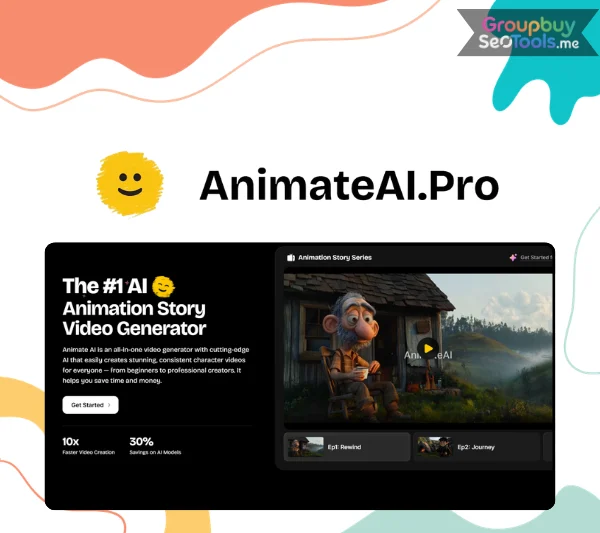
  • You will receive: Animate AI(shared account)
  • Homepage: https://animateai.pro/
Product Information
  • Description

Contents

  1. The Animate AI Value Proposition — What It Actually Claims?
  2. How Animate AI Is Built ?
  3. Animate AI Feature
    1. Character System: Design, Lock, Reuse
    2. The AI Storyboard: Pre-Production at Scale
    3. Multi-Model Video Generation
    4. Autopilot Mode: Production Without Manual Steps
    5. Template Library
    6. Audio: Voiceover and Music Integration
    7. AI Video Enhancer
  4. Animate AI Pricing and Credit System
    1. Standard Plan
  5. One-Time Credit Packs
  6. Real-World Use Cases for Animate AI
    1. The Animated YouTube Channel
    2. Kids’ Stories and Children’s Educational Content
    3. Animated Marketing and Brand Videos
    4. Social Media Animated Content
    5. Educational and Training Video
    6. Use Case Fit Guide
  7. Animate AI vs the Best Alternatives
    1. vs Kling AI (Direct)
    2. vs Runway ML
    3. vs Sora (OpenAI)
    4. vs Vyond / Animaker
    5. The Honest Comparison Table
  8. Who Animate AI Is Built For ?
    1. The strongest fits
    2. Where it fits less well
  9. What Works, What Does Not, and What Users Report
    1. What genuinely works
    2. What does not work as well
    3. What users have reported
  10. Five Production Practices That Improve Animate AI Output
  11. Animate AI Questions Answered
  12. Should You Use Animate AI?

Animate AI
The animated video production stack for most creators looks like this:

A script written in Google Docs. Character references assembled in Figma or Canva. Storyboards built manually or outsourced to a freelancer. Video clips generated one at a time in Kling or Runway. Voiceovers recorded separately and imported into Premiere. Music sourced from a subscription library. Final edit assembled by hand.

Seven tools. Seven workflows. Three to four weeks per episode. Thousands of dollars per minute of finished animation.

Animate AI makes one specific claim against this stack: that a single platform — one subscription, one interface, one production pipeline — can replace the entire workflow and deliver a finished animated video 10x faster at 30% lower cost.

This review tests that claim. Not the marketing version of it — the technical version. What the architecture actually does, what the output actually looks like, where the platform genuinely delivers, and where the honest gaps are.

Here is what the investigation found.


The Animate AI Value Proposition — What It Actually Claims?

animateai-pro-video-showcases-covering-movie-trailer-kids-bedtime-story-and-lofi-music-video
Produce professional-grade, stylized video content automatically, including epic movie trailers and cozy Lofi animations, with zero technical expertise.

Before evaluating a platform, it is worth being precise about what it claims — because the claim defines the standard by which it should be judged.

Animate AI makes three specific claims:

Claim 1: World’s first all-in-one AI video generator for animated series. The emphasis is on “animated series” — not single clips. The platform is explicitly designed for multi-scene, multi-episode content with character continuity, not isolated clip generation.

Claim 2: 10x faster than traditional animation. This refers to the complete production cycle — character design through finished video — compared to traditional frame-by-frame animation or outsourced production workflows.

Claim 3: 30% cost savings on AI model usage. This refers specifically to the platform’s multi-model fusion architecture, which routes generation tasks to the most credit-efficient model meeting quality requirements for each scene — not a comparison against traditional production costs.

The first claim is the one that matters most technically. Single-clip AI video generation is a solved problem — dozens of tools do it well. The unsolved problem, the one that has made every other AI video tool inadequate for series production, is character consistency.

The character consistency problem: diffusion-based video models (Kling, Runway, Sora, MiniMax Hailuo) generate each scene independently. Without external consistency enforcement, the same character described with the same prompt looks visually different in every generation — different facial proportions, different hair, different clothing details. For a YouTube series, a kids’ story, or any multi-episode animated content, this makes the output unusable.

Animate AI’s claim is that its architecture solves this. The technical evaluation of how it does so is the core of this review.

How Animate AI Is Built ?

Animate AI is structured as a four-layer production system sitting on top of multiple AI video generation models rather than replacing them.

Layer 1 — Character consistency infrastructure

The foundation layer. Reference image locking anchors character visual identity to a base reference using img2img and control net integration — each generation conditions against this reference rather than generating from text alone. Persistent visual memory stores character identity and references it automatically at every scene generation without manual re-prompting. The combination produces cross-scene visual continuity that text-prompt-only generation cannot achieve.

Layer 2 — Storyboard production system

The storyboard layer converts scripts into structured production documents. NLP parsing identifies narrative beats, generates scene visuals and descriptions, assigns camera angles and timing, and integrates narration with voiceover sync. All panels are editable before any credit-consuming generation begins.

Layer 3 — Multi-model generation engine

Five AI video generation models selectable at the scene level: Kling 1.6 Standard, Kling 1.6 Pro, MiniMax Hailuo 02, Kling 2.0 Master, and Kling V2.5 Turbo Pro. Automated prompt optimization enhances scene descriptions before sending to generation models.

Layer 4 — Production automation (Autopilot)

The autopilot layer renders the full video from an approved storyboard without manual step-by-step generation. Voiceover integration, per-character voice assignment, and music generation run embedded in the autopilot sequence.

The architectural logic: Animate AI does not try to build a better video generation model. It builds the production infrastructure — consistency enforcement, storyboard management, multi-model routing, voiceover integration — that turns individual clip generators into a series production pipeline.

Animate AI Feature

animateai-pro-ai-storyboard-generation-and-30-second-video-creation-interfaceConvert any script into an editable visual storyboard, then render high-quality 30-second clips with a single click.</caption]

Character System: Design, Lock, Reuse

The character system is the platform’s technical foundation. Characters are created through style parameter inputs, visual appearance descriptions, and voice assignment. The character library stores completed characters for instant reuse across unlimited future projects.

  • Reference image locking is the primary consistency mechanism. Uploading a reference image provides a visual ground truth the model checks against at every generation — producing significantly more consistent cross-scene results than text-based generation alone. For creators building multi-episode series, this is the feature that makes the format viable.
  • Per-character voice assignment applies a distinct AI voice to each character consistently throughout all dialogue across the production without manual voice selection at each scene.
  • Multi-character scene management provides main character and background character slots per scene for complex multi-character compositions without losing consistency control over individual characters.

The AI Storyboard: Pre-Production at Scale

The storyboard system transforms scripts into structured, editable production documents. Each panel is generated with: scene visual, scene description, narration text, voiceover timing, camera angle, and movement specification.

Zero-credit editing is the most operationally important feature in the storyboard system. Every panel adjustment — camera angle, scene prompt, narration, pacing — happens at zero credit cost. All improvements at this stage carry forward into video generation for free. Corrections after autopilot generation require credit-consuming re-renders.

The production implication: the storyboard review is the highest-leverage quality investment in the entire pipeline. Time spent here is worth significantly more than equivalent time spent anywhere else in the production process.

Multi-Model Video Generation

Five generation models available with scene-level selection:

Model Quality Credit Cost Ideal For
Kling 1.6 Standard Standard Low Establishing shots, backgrounds
Kling 1.6 Pro Good Moderate-low Standard narrative scenes
MiniMax Hailuo 02 Varied style Moderate Style variation, alternative looks
Kling 2.0 Master High Moderate-high Hero scenes, complex interactions
Kling V2.5 Turbo Pro Premium High Cinematically critical scenes


Scene-level model selection enables credit budget optimization: applying efficient models to background and transitional scenes, premium models to close-ups and hero scenes. This granularity is how the 30% cost savings claim is operationalized in practice.

Autopilot Mode: Production Without Manual Steps

Autopilot renders the complete video from an approved storyboard — full scene sequence, locked character consistency, per-character voiceover, music integration — without step-by-step manual generation. This is the mechanism behind the 10x speed claim: not individual scene rendering, but full-pipeline automated production.

Template Library

Pre-built production templates from the Animate AI creator community: animated trailers, kids’ stories, motivational clips, explainer videos, social media reels, YouTube series formats. Templates function as production starting points and quality benchmarks. Customizing templates with original characters and scripts produces stronger results than publishing defaults.

Audio: Voiceover and Music Integration

AI voiceover generation is embedded in the production pipeline with narration timing synchronized to storyboard during autopilot rendering. Per-character voices run consistently throughout all dialogue automatically. Music integration follows the same embedded workflow model.

AI Video Enhancer

Post-render quality refinement tools for scenes that do not meet production standards on initial generation. Targeted enhancement without full re-rendering in all cases.

animateai-pro-features-including-ai-model-integration-autopilot-mode-and-video-enhancementSimultaneously link prompts across leading generators like Midjourney or Flux and deploy smart autopilot enhancements for superior video quality.

Animate AI Pricing and Credit System

Features Standard Plan Pro Plan
Price $5.99 first week
Then $39.99/month
$99.99/month
Credits per Month 500 Credits 2,000 Credits
Daily Login Bonus +60 Credits/month +60 Credits/month
Supported Video Models Kling 1.6 Standard
Kling 1.6 Pro
MiniMax Hailuo 02
Kling 1.6 Standard
Kling 1.6 Pro
MiniMax Hailuo 02
Kling 2.0 Master
Kling V2.5 Turbo Pro
Scenes per Video Up to 10 scenes Up to 10 scenes
Queue Limit Up to 2 tasks Up to 2 tasks
Fast-Track Generation ✓ ✓
Multi-Language Support ✓ ✓
Ultra-High-Quality Models ✓ ✓
No Watermarks ✓ ✓
Personalized Tech Support — ✓
Priority Access to New Models & Features — ✓

Standard Plan

    • Start with a 7-day trial for only $5.99
    • Receive 200 credits during the trial week
    • Full access to all Standard Plan features
    • Automatically renews at $39.99/month after 7 days
    • Cancel anytime

One-Time Credit Packs

Need extra credits? Purchase additional credits anytime. Credits expire 30 days after purchase.

Credit Pack Price
200 Credits $19.99
500 Credits $39.99
1,000 Credits $59.99
2,000 Credits $99.99

animateai-pro-pricing-plans-comparing-standard-and-pro-monthly-credit-subscription-cards Explore monthly credit packages designed to scale seamlessly from basic personal projects to heavy-duty enterprise video rendering.

Real-World Use Cases for Animate AI

The Animated YouTube Channel

The use case with the most direct alignment to the platform’s design. Multi-episode animated channels require character consistency across episodes — the production requirement that standard AI video tools cannot meet. Animate AI handles episode-to-episode continuity automatically through the character library and persistence system. The storyboard and autopilot workflow handles per-episode production without rebuilding character assets between recordings.

Kids’ Stories and Children’s Educational Content

Character-driven narrative for children’s animation depends more heavily on character consistency than perhaps any other video format — viewers build attachment to characters, and visual inconsistency breaks that attachment. The template library specifically supports kids’ story formats. Voiceover and music integration handles the audio production elements that would otherwise require separate tools.

Animated Marketing and Brand Videos

Animated explainer videos, product features, and brand storytelling. Agency-commissioned animated marketing videos typically cost thousands of dollars and take weeks. Animate AI compresses turnaround to hours and cost to a monthly subscription. The template library provides standard explainer formats for faster production.

Social Media Animated Content

Short-form animated content for TikTok, Instagram Reels, YouTube Shorts. The free plan’s 3-scene limit covers most short-form formats, making it viable for social content evaluation without a paid subscription.

Educational and Training Video

Animated instructional content for e-learning courses, onboarding, and corporate training. Significantly lower cost than commissioned animated e-learning with comparable output quality.

Use Case Fit Guide

Content Type Scenes Needed Free Plan Right Plan
YouTube series episode 8–15 No Standard / Pro
Kids’ story 5–10 Test only Standard
Marketing explainer 4–8 Test only Standard
Social reel 2–4 Yes Free / Standard
Animated trailer 6–12 No Standard / Pro
Training module 10–20 No Pro

Animate AI vs the Best Alternatives

vs Kling AI (Direct)

The most clarifying comparison. Kling AI is the technology running three of Animate AI’s five generation engines (Kling 1.6, 2.0, V2.5). Kling’s own platform generates individual high-quality clips. It has no native storyboard system, no character consistency architecture, and no series production workflow.

Animate AI is what Kling AI becomes when you add series production infrastructure on top of it. For isolated clip generation, Kling’s platform works well. For animated series using Kling technology, Animate AI is the necessary layer above it.

vs Runway ML

Runway excels at cinematic live-action generation, video editing, and VFX. Different design target from Animate AI: live-action and editing versus animated series production. For live-action, Runway is the stronger tool. For animated series with character consistency, Animate AI covers what Runway is not designed for.

vs Sora (OpenAI)

Sora generates high-quality video including animated styles. No multi-scene pipeline, no character consistency architecture, no storyboard system. Achieving cross-scene consistency requires significant prompt engineering with inconsistent results. The fundamental comparison: Sora is a generation model. Animate AI is a production system built on top of generation models. For series production, infrastructure matters as much as generation quality.

vs Vyond / Animaker

Template-based platforms with pre-built character libraries and manual scene configuration. Neither uses AI character generation or automated storyboarding. Animate AI produces comparable output quality faster with AI-native workflows that extend beyond fixed template constraints.

The Honest Comparison Table

Platform Character Consistency Storyboard Series Production AI Models Price/Month Best Use
Animate AI ✔ Native ✔ Automated ✔ Full pipeline 5 models $29–$100 Animated series
Kling AI ✗ ✗ ✗ Kling $37 (Pro) Quality single clips
Runway ML ✗ ✗ ✗ Runway Gen-3 $15–$95 Live-action, editing
Sora ✗ Native ✗ ✗ Sora ~$20 Premium clip generation
Vyond Template-based Manual ✗ None $49–$89 Template animation
Synthesia Human avatars ✗ ✗ Synthesia $29+ Corporate presenter

Who Animate AI Is Built For ?

The strongest fits

  • Animated YouTube creators who need consistent characters across episodes without studio budgets or traditional animation skills. This is the platform’s primary design target.
  • Educators and e-learning developers producing animated instructional content at a cost that replaces commissioned animated e-learning agencies.
  • Digital marketers produce branded animated content in-house — explainer videos, social reels, product features — faster and cheaper than external production.
  • Kids’ content creators for whom character consistency and narrative continuity are format requirements, not preferences.
  • Indie filmmakers and storytellers building animated short films and series without production teams or studio budgets.

Where it fits less well

  • Live-action video producers who need photorealistic human figures and real-world environments.
  • Single-clip users whose requirements are one isolated video with no continuity needs — a simpler tool serves this better.
  • Users who need guaranteed self-service account management — based on 2025 user reports, subscription management currently requires email contact rather than dashboard self-service.

What Works, What Does Not, and What Users Report

What genuinely works

  • The character consistency architecture solves the right problem. Reference image locking combined with persistent visual memory addresses the specific technical limitation — stochastic variation in diffusion model outputs — that makes single-clip AI tools unusable for series production. This is structural, not cosmetic.
  • The pipeline is genuinely integrated. Script to storyboard to voiceover to video to export in one platform, without tool-switching at any stage. The production value of this integration is real and measurable in production time.
  • Five models in one subscription with scene-level selection. The combination of model range and scene-level granularity is unusual in the market. Credit optimization across a production is possible in a way that single-model platforms cannot match.
  • Free plan is a genuine evaluation tool. Full pipeline, 40 credits plus daily bonuses, 3-scene output. Sufficient for a real evaluation on real content.

What does not work as well

  • Not for live-action or photorealistic content. Animate AI produces animated content. For any live-action requirement, a different tool is needed.
  • Credit limits are real constraints at lower plans. High-volume producers on the Standard plan will encounter ceiling limits on monthly output. Model credit consumption on the Pro plan should be calculated against actual production volumes before subscribing.
  • Complex scenes require storyboard iteration. Unusual spatial compositions, complex multi-character interactions, and atypical visual requests need prompt refinement at the storyboard stage before generation. Users who do not invest in storyboard editing will get generic outputs.

What users have reported

Trustpilot reviews from October–November 2025 document consistent issues with billing and subscription management:

  • No visible cancel button in the account dashboard
  • No cancel option in the Stripe billing management portal
  • Cancellation requiring direct email to [email protected]
  • The $3.99 trial auto-renewing to full subscription without clear advance notice

Animate AI’s official responses confirm the email cancellation process and state requests are handled daily.

These are consistent reports from real users. A review that does not include them is incomplete. Email [email protected] to confirm the current process before entering any payment details.

Five Production Practices That Improve Animate AI Output

  • Practice 1: Reference image before text generation. Text-based character creation works. Reference image locking works significantly better for cross-scene consistency. A character sketch, a close visual reference, or even a rough concept image provides a ground truth the model anchors to at every subsequent generation.
  • Practice 2: Maximize storyboard editing time. Zero-credit storyboard editing is the most credit-efficient quality investment in the entire workflow. Every camera angle adjustment, scene prompt refinement, and narration edit made before autopilot generation improves the video at no cost. Every correction made after costs re-render credits. The allocation of time between these two stages should reflect this asymmetry.
  • Practice 3: Use scene-specific prompts. Each panel needs its own description: lighting quality, character expression, action in progress, camera angle, spatial arrangement, emotional tone. Episode-level summaries produce average outputs. Scene-specific descriptions produce better ones.
  • Practice 4: Reserve premium models for premium scenes. Kling V2.5 Turbo Pro for close-ups, emotional beats, and hero sequences. Kling 1.6 Standard for establishing shots, wide environments, and transitional scenes. Scene-level model matching is how credit budgets extend across longer productions.
  • Practice 5: Build the character library deliberately. Save every character to the library before closing any session. Rebuilding a lost character with guaranteed visual accuracy to the original is not reliably possible. The character library is the production asset that makes multi-episode series viable — treat it accordingly.

Animate AI Questions Answered

  1. What is Animate AI in plain terms?
    An AI-powered platform for producing animated video series. Input a script, generate characters with locked visual identities, produce an automated storyboard, run autopilot video generation with voiceovers and music, and export a finished animated video — entirely within one platform. Designed specifically for multi-scene content with consistent characters, not single-clip generation.
  2. How does character consistency actually work?
    Reference image locking conditions every scene generation against a base visual reference using img2img and control net technology. Persistent visual memory stores and reapplies character identity at each scene without user re-prompting. The combination prevents the visual drift that makes other AI tools unusable for series production.
  3. Which AI models does it use?
    Five: Kling 1.6 Standard, Kling 1.6 Pro, MiniMax Hailuo 02, Kling 2.0 Master, and Kling V2.5 Turbo Pro. Selectable at the scene level. Premium models require the Pro plan.
  4. What does the free plan include?
    40 credits/month + 60 daily login bonus credits. Up to 3 scenes per video. Watermarked output. Standard models. Full production pipeline. No payment required.
  5. Can it produce a YouTube series?
    Yes — this is the primary design purpose. Characters saved in the library maintain visual consistency across unlimited episodes automatically.
  6. How does it differ from Kling or Runway?
    Kling and Runway generate single clips. Animate AI is the production infrastructure that runs on top of those models: character consistency system, storyboard management, autopilot rendering, voiceover integration. The production system is the differentiator.
  7. What does it produce best?
    Animated series with consistent characters: YouTube episodes, kids’ stories, explainer videos, educational modules, social media animated reels. Not designed for photorealistic live-action video.

Should You Use Animate AI?

The core claim holds: Animate AI is the only platform that combines native character consistency, automated storyboarding, multi-model AI video generation, and series production workflow in one subscription. For animated series production, no comparable alternative currently exists.

For creators who have been blocked by the character drift problem — who have tried Kling, Runway, or Sora for series content and found them unusable for that specific purpose — Animate AI provides the infrastructure that single-clip tools do not.

For creators who need photorealistic live-action video, single-clip generation with maximum model quality, or guaranteed self-service subscription management, the platform is not the right fit.

Customer Reviews & Feedback

There are no reviews yet.

Related products

Puppetry
AI Video cart grey 0

Puppetry

AI Video cart grey 0
$39.00
Buy cart
CapCut
AI Video cart grey 0

CapCut Pro

AI Video cart grey 0
$6.00 – $50.00Price range: $6.00 through $50.00
Buy cart
VideoGen
AI Video cart grey 0

VideoGen AI

AI Video cart grey 0
$19.00 – $179.00Price range: $19.00 through $179.00
Buy cart
Scrollpop AI
Ad Spy cart grey 0

Scrollpop AI

Ad Spy cart grey 0
$67.00
Buy cart
Otter AI
AI Video cart grey 0

Otter AI Business

AI Video cart grey 0
$27.00
Buy cart
-75%
EasyVSL
AI Video cart grey 0

EasyVSL + OTOs

AI Video cart grey 0
$485.00 Original price was: $485.00.$120.00Current price is: $120.00.
Buy cart
Product categories
  • Ad Spy
  • AI
    • AI All-in-One
    • AI Audio
    • AI Chat Bot
    • AI Dev
    • AI Images
    • AI Video
  • Cloud & Storage
    • VPNs
  • Content Tools
    • AI Detector Tools
    • Content Optimization
    • Copywriting Tools
    • Grammar Tools
    • Paraphraser Tools
    • Plagiarism Tools
    • Researcher Tools
    • Translator Tools
    • Writing Tools
  • Ecom Tools
    • Amazon Tools
    • Etsy Tools
    • KDP Tools
    • POD Tools
  • Edu Tools
  • Email & Leads
  • Others
  • Relax Tools
  • SEO Tools
    • Backlink Tools
    • Domain Tools
    • Indexer Tools
    • Keyword Tools
    • Link Lists
    • Local SEO
    • Rank Tracker Tools
    • SEO AIO Tools
    • Technical SEO Tools
  • Social Tools
  • Stocks Library
  • Youtube Tools
Latest Products
  • Madgicx Madgicx $98.00
  • Scrivener + OTO Scrivener + OTO $27.00
  • Yepic AI Yepic AI $101.00
  • iLovePDF iLovePDF $22.00
  • iLoveIMG iLoveIMG

GroupbuySeoTools.me | best seo tools group buy at cheap price.

Address : 11/777, Braf Hmadelkahoi Rd, Princess Dock, Mumbai Port Trust, Mazgaon, Mumbai, Maharashtra 400009, India

About Us
Contact Us
News
FAQ
Affiliate
Privacy Policy
Terms of Use
AML Policy
DMCA Policy
Refund Policy
Copyright Policy
DMCA
GDPR Notice

Visa
PayPal
Stripe
MasterCard
Cash On Delivery

Copyright 2026 © GroupbuySeoTools.me. All Rights Reserved.

Visa
PayPal
Stripe
MasterCard
Cash On Delivery
Copyright 2026 © GroupbuyseoTools.me
  • Ad Spy
  • AI
    • AI All-in-One
    • AI Audio
    • AI Chat Bot
    • AI Dev
    • AI Images
    • AI Video
  • Cloud & Storage
    • VPNs
  • Content Tools
    • AI Detector Tools
    • Content Optimization
    • Copywriting Tools
    • Grammar Tools
    • Paraphraser Tools
    • Plagiarism Tools
    • Researcher Tools
    • Translator Tools
    • Writing Tools
  • Ecom Tools
    • Amazon Tools
    • Etsy Tools
    • KDP Tools
    • POD Tools
  • Edu Tools
  • Email & Leads
  • Others
  • Relax Tools
  • SEO Tools
    • Backlink Tools
    • Domain Tools
    • Indexer Tools
    • Keyword Tools
    • Link Lists
    • Local SEO
    • Rank Tracker Tools
    • SEO AIO Tools
    • Technical SEO Tools
  • Social Tools
  • Stocks Library
  • Youtube Tools
  • Login
  • Newsletter

Login

Login with your Social ID

Lost your password?