Google
 Microsoft
 Adobe
Adobe Canva
Canva Kaspersky
iLoveIMG

Sent via customer’s email
12-24hrs
All-in-one Subscription
iLoveIMG: Powerful tools for seamless batch editing, compression, and image optimization.
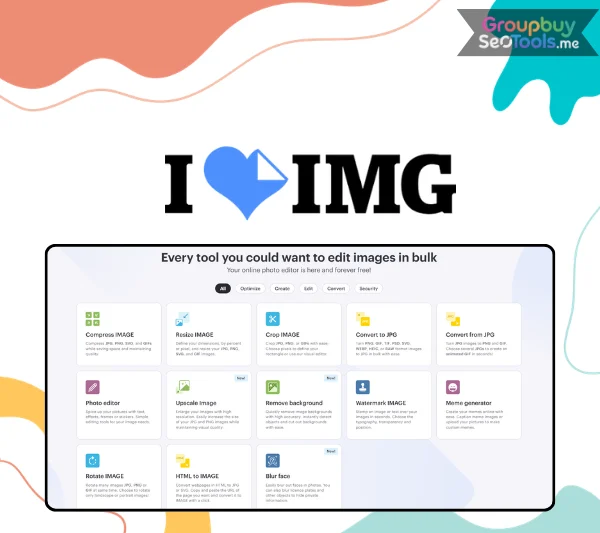
If you’ve ever spent 20 minutes trying to resize a single image — downloading software, creating an account, navigating menus, realizing the export was wrong — you already understand the problem iLoveIMG was built to solve.
Most image tools are designed for professionals who use them every day. iLoveIMG is designed for everyone else: the blogger who needs to compress 30 photos before publishing, the ecommerce seller who wants clean product cutouts without hiring a designer, the web developer who needs WebP conversions done yesterday. No installation. No learning curve. No subscription to do the basics.
This guide covers everything: what the platform is, how every tool works, who it’s built for, what it costs, and how it stacks up against the alternatives.
iLoveIMG is a browser-based image processing platform that lets you compress, resize, crop, convert, and manipulate images without installing any software or signing up for anything. It launched in 2016 from Barcelona, Spain, built by the same team behind iLovePDF — one of the most widely used PDF tools on the web.
The platform has since expanded from a basic utility into a suite of 20+ tools, adding AI-powered capabilities like background removal and image upscaling alongside its original processing tools. It has processed hundreds of millions of images for users in 25+ languages across virtually every country in the world.
The business model is freemium: core tools are free with no registration required, while a Premium plan at $4/month (billed annually) unlocks unlimited processing, AI features, and an ad-free experience. A Business tier serves larger organizations.
What sets iLoveIMG apart isn’t any single feature — it’s the combination of breadth (20+ tools), accessibility (no download, no account for basics), and the fact that batch processing is free. That last point matters more than it sounds: most competing platforms treat bulk operations as a premium feature. iLoveIMG doesn’t.
The workflow is the same across every tool on the platform:
Step 1 — Choose your tool. Navigate to the tool you need from the homepage. Each tool has its own dedicated page with a clean, focused interface.
Step 2 — Upload your images. Drag and drop files, click to browse your device, or import directly from Google Drive or Dropbox. Most tools accept multiple files for batch processing.
Step 3 — Adjust settings (if needed). Some tools require configuration — target dimensions for resizing, output format for conversion, watermark text and position, and so on. Others (like compression) work with sensible defaults and require no input at all.
Step 4 — Process. Click the action button. Processing happens on iLoveIMG’s servers, typically in a few seconds even for large batches.
Step 5 — Download. Results download as a ZIP file for batches or as a single file for individual images.
After processing, your files are automatically deleted from iLoveIMG’s servers within two hours. All uploads are encrypted in transit. The platform does not use your images for advertising, training, or any other purpose.
The most-used tool on the platform — and the one that demonstrates iLoveIMG’s approach most clearly. Upload JPG, PNG, SVG, or GIF files and the platform reduces file sizes while preserving visual quality as closely as possible.
Free bulk compression is the headline feature here. Competing tools like TinyPNG limit batch size on free plans. iLoveIMG does not. Upload 50 images and compress them all in a single pass, for free, without an account.
Ideal for: Bloggers optimizing images before publishing, web developers reducing page weight, social media managers preparing content batches.
Resize JPG, PNG, and GIF images by entering exact pixel dimensions or specifying a percentage of the original size. The batch resize feature handles hundreds of images simultaneously with identical settings — consistent output across every file in the batch.
A useful option that often goes unmentioned: you can lock aspect ratio to prevent distortion, or unlock it to force specific dimensions regardless of the original proportions.
Ideal for: Ecommerce sellers needing consistent product image dimensions across platforms, content teams with strict image size requirements.
Crop to custom dimensions or choose from preset aspect ratios (square, 16:9, 4:3, and others). Batch cropping applies identical crop settings across multiple images — useful when you need to standardize framing across a large set of photos.
Ideal for: Standardizing thumbnails, creating consistent social media grids, prepping profile pictures in bulk.
iLoveIMG handles format conversion between JPG, PNG, GIF, WebP, and HEIC. The HEIC support is worth highlighting specifically: Apple’s iPhone cameras have used HEIC as the default format for years, and a surprising number of online converters still handle it poorly. iLoveIMG converts HEIC to JPG cleanly and in bulk.
Beyond file-to-file conversion, there’s an HTML-to-image tool: paste any webpage URL and convert it directly to JPG or SVG. Useful for developers capturing layout states as static images for documentation or presentations.
Ideal for: iPhone users converting photos, web developers converting assets to WebP for performance, designers capturing webpage layouts.
An AI-powered tool that automatically detects the subject of an image and removes the background — no manual selection, masking, or design skill required. Results are delivered in seconds and work well on product photos, portraits, and objects with clearly defined edges.
Background removal runs on AI credits rather than counting toward file processing limits. Free users can try the tool; Premium subscribers receive 2,000 AI credits per month.
Ideal for: Ecommerce sellers creating clean product photos, marketers producing cutout images for ads and presentations.
AI-driven image enlargement that increases JPG and PNG dimensions by up to 4x the original size. The difference between AI upscaling and standard enlargement is meaningful: where conventional scaling blurs and pixelates, machine learning upscaling reconstructs detail and maintains sharpness.
Runs on AI credits (Premium plan).
Ideal for: Recovering low-resolution images for print use, enlarging older photos, creating high-resolution versions of digital assets.
Stamp text or an image over photos with full control over font, size, color, opacity, rotation, and position. Batch watermarking applies identical marks across an entire set of images simultaneously — one of the more practically valuable features for photographers, agencies, and anyone distributing images at volume.
Ideal for: Photographers protecting images before sharing proofs, brands applying consistent logo watermarks to content batches.
Rotate and flip JPG, PNG, and GIF images in bulk. A particularly useful setting: apply rotation only to landscape images, or only to portrait images. This matters when importing from cameras or phones where mixed orientations within the same batch require different treatment.
A browser-based editor with color adjustments, filter effects, frame overlays, text placement, and sticker additions. Not a replacement for Photoshop — it’s designed for casual editing needs: brightening a photo, adding a caption, applying a frame. The tool is functional and fast without requiring any design experience.
Select areas of an image to blur — faces, license plates, document numbers, or anything else that shouldn’t be visible in a published image. Useful for news publishers, social media users sharing group photos, and anyone anonymizing screenshots or documents before distribution.
A meme generator supporting both classic internet templates and custom image uploads, with text styling options to match standard meme formats. Simple, fast, and free.
Combine multiple images into an animated GIF with control over frame timing and loop behavior. Works well for simple product animations, how-to sequences, and social media content.
This deserves emphasis because it’s genuinely unusual. Most image processing platforms — TinyPNG, Adobe Express, and others — restrict bulk operations to paid tiers. iLoveIMG includes batch processing in the free tier across compression, resizing, cropping, conversion, watermarking, and rotation. For users with recurring high-volume image needs, this alone makes the platform worth using.
Import images directly from Google Drive or Dropbox, and save processed results back to cloud storage without downloading locally first. For users working across multiple devices or managing image libraries in the cloud, this eliminates a significant friction point.
All uploaded files are encrypted during processing and automatically deleted from iLoveIMG servers within two hours of processing. The platform does not mine uploaded images for data or advertising. For users handling sensitive images — personal photos, client materials, confidential documents — this is a meaningful default.
The platform supports 25 languages including English, Spanish, French, German, Italian, Portuguese, Japanese, Korean, Chinese (Simplified and Traditional), Arabic, Hindi, Indonesian, Vietnamese, Polish, Thai, Turkish, and more.
The browser-based architecture means iLoveIMG works on any device with a modern web browser — desktop, laptop, tablet, or smartphone. Premium and Business plans extend the full feature set explicitly across web, mobile, and desktop.
The free plan covers all core tools with no registration required. Batch processing is included. File size limits apply for large or high-resolution images, and AI-powered tools (background removal, upscaling) consume credits rather than being freely available. Ads are present on the free tier.
Premium removes ads, lifts file size limits, enables unlimited processing, and provides 2,000 AI credits per month for background removal and upscaling. Regional file processing (data stays closer to your location) is also included.
Important limitation: AI credits do not roll over. If you use fewer than 2,000 AI operations in a given month, the remainder expires at the next billing cycle. Heavy AI users may exhaust their allocation before month’s end.
Designed for organizations with 25 or more users. Includes custom contracts, a dedicated account manager, Single Sign-On (SSO) integration, and customized AI credit allocations.
| Basic | Premium | Business | |
| Price | Free | $4/month (annual) | Contact sales |
| Users | 1 | Up to 25 | 25+ |
| Processing | Limited | Unlimited | Unlimited |
| AI Tools | ✗ | ✓ (2,000 credits/mo) | ✓ (custom) |
| Ad-free | ✗ | ✓ | ✓ |
| Priority support | ✗ | ✓ | ✓ |
| SSO | ✗ | ✗ | ✓ |
| Account manager | ✗ | ✗ | ✓ |
Squoosh is Google’s single-image compression tool with exceptional quality control — you can see the before/after comparison in real time and tune compression parameters precisely. For single-image optimization where output quality needs fine adjustment, Squoosh is excellent.
Where iLoveIMG wins: batch processing, tool breadth, and workflow efficiency. Squoosh handles one image at a time. iLoveIMG handles 100.
Choose Squoosh if: You’re optimizing individual images with precise quality requirements. Choose iLoveIMG if: You need to process batches or use multiple tools in the same workflow.
TinyPNG is a focused compression tool for PNG and JPG with strong results. The free tier is limited in batch size and the platform doesn’t extend beyond compression — no resizing, no format conversion, no watermarking.
iLoveIMG covers compression plus everything else, with free batch processing that TinyPNG restricts.
Choose TinyPNG if: Compression is your only need and you process a small number of files. Choose iLoveIMG if: You need compression plus other tools, or need to compress in bulk for free.
Remove.bg is purpose-built for background removal and is excellent at it — particularly on product photos and portraits with complex edges. It offers more advanced options and better output quality for edge cases than iLoveIMG’s AI tool.
The tradeoff: Remove.bg does one thing. iLoveIMG does background removal plus 20+ other tools under one roof.
Choose Remove.bg if: Background removal is your primary, high-volume use case and quality on difficult images matters. Choose iLoveIMG if: You need background removal alongside compression, resizing, and other processing tasks.
These tools serve fundamentally different purposes. Canva is a design creation platform: templates, brand kits, social media graphics, and visual publishing workflows. iLoveIMG is an image processing utility: compression, conversion, resizing, and format transformation.
Users often need both. Canva for creating; iLoveIMG for processing the output.
Choose Canva if: You’re designing from scratch using templates and brand assets. Choose iLoveIMG if: You’re processing existing images — compressing, converting, resizing, cleaning up.
iLoveIMG exposes its image processing tools via the iLoveAPI REST API — the same infrastructure that powers the web interface, accessible programmatically.
The API covers: compression, resizing, cropping, watermarking, background removal, format conversion, rotation, and more.
Technical specifications:
For developers building image processing pipelines, CMS integrations, or any application that needs bulk image handling, the API provides the same processing quality as the web interface at scale.
iLoveIMG occupies a specific, useful space in the image tool landscape: it’s the platform you reach for when you need to process images quickly, in bulk, and without installing anything or paying for a subscription.
It won’t replace Photoshop for professional retouching. It won’t match Remove.bg for edge-case background removal quality. It won’t out-design Canva. But for the practical image tasks that come up repeatedly in content, ecommerce, development, and everyday digital work — compressing files, converting formats, resizing batches, removing backgrounds, adding watermarks — iLoveIMG does the job faster and more completely than any other free tool in the category.
The free batch processing is the real story here. Other platforms charge for what iLoveIMG gives away. For anyone who regularly processes more than one image at a time, that’s a meaningful difference.
For bloggers, ecommerce sellers, social media managers, web developers, and anyone who deals with images as a regular part of their work, iLoveIMG is a practical, reliable, and genuinely free solution that holds up in 2026.
There are no reviews yet.