Google
 Microsoft
 Adobe
Adobe Canva
Canva Kaspersky
WebCeph PREMIUM
$50.00

$50.00
Sent via customer’s email
12-24hrs
All-in-one Subscription
WEBCEPH™ is a FDA 510k-cleared and KFDA approved A.I. driven Online Orthodontic Diagnostic Software for Dentists.
Official website: https://webceph.com/en/
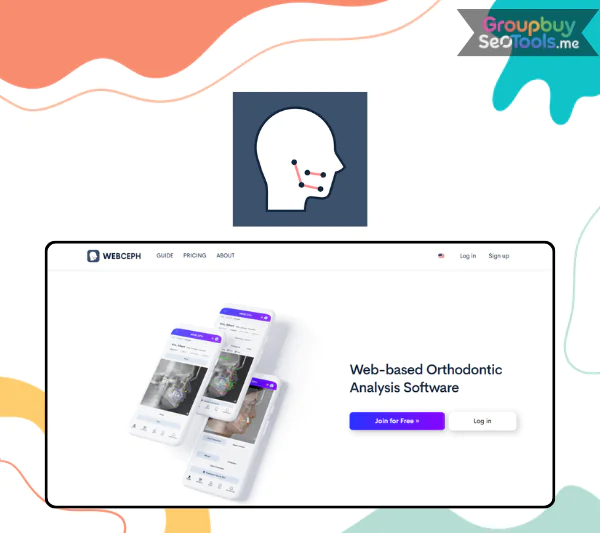 WebCeph is a web based, AI powered orthodontic and cephalometric imaging platform that automates landmark detection, tracing, analysis, treatment simulation, and reporting, all from a browser or mobile app with no installation required. It has rapidly become one of the most widely adopted tools in modern orthodontics because it compresses what used to be 30 to 60 minutes of manual cephalometric work into a process that often takes under a minute, while keeping the clinician fully in control of every decision.
This guide is written for the people who would actually open such a platform on a Monday morning. That includes practicing orthodontists, oral and maxillofacial surgeons, general dentists who handle orthodontic cases, residents, dental students, and researchers running cephalometric studies. By the end, you will know exactly what WebCeph is, how it works, what features it offers, how it compares with manual tracing and legacy software, and whether it deserves a place in your clinic, classroom, or research workflow.
Here is what this article will cover, fully updated for 2026:
To understand whether WebCeph fits your workflow, you first need a clear, simple definition and then a look at how it actually works in practice.
WebCeph is a web based platform for cephalometric tracing, cephalometric analysis, treatment simulation, and ortho surgical planning, powered by artificial intelligence that automatically detects anatomical landmarks on lateral cephalograms. It runs entirely in a standard web browser, with companion iOS and Android apps for clinicians who prefer to work on a tablet or phone next to the patient chair.
The platform exists to solve a very specific bottleneck. For decades, cephalometric analysis meant either manual tracing on acetate or semi manual digitization on desktop software. Both approaches are slow, inconsistent between operators, and difficult to standardize across a clinic or a research study. WebCeph replaces that with one click AI tracing, then layers on the classic analyses orthodontists already know and trust, including Steiner, Downs, Ricketts, McNamara, Tweed, Bjork, Harvold, and many more.
The core problems WebCeph solves are clear:
Typical use cases include daily orthodontic patient records, pre and post surgical orthognathic evaluations, teaching cephalometric landmarking to students, and large dataset analysis for academic research. Independent studies have reported intraclass correlation coefficients above 0.95 for many landmarks, with WebCeph completing the first AI pass in seconds instead of the 20 to 40 minutes a manual tracing typically requires. That speed gain is the headline reason it has spread so quickly through orthodontic practices and dental schools.
The WebCeph workflow is intentionally simple. Once you create an account on the WebCeph website or in the mobile app, the entire process from raw radiograph to exportable report follows a predictable sequence that you can complete during a single patient consult.
It is worth being explicit about where AI ends and clinician judgment begins:
| Stage | Handled by AI | Handled by Clinician |
| Image upload | Auto sorting and format checks | Selecting the correct patient and image |
| Landmark detection | Automatic detection of 30+ points | Verification and minor adjustments |
| Measurement calculation | Instant computation of all values | Choice of analyses and interpretation |
| Treatment simulation | Generates visual overlays from inputs | Defines treatment goals and constraints |
| Final diagnosis | Provides numerical and visual data | Owns the clinical decision |
Because the platform is cloud based, every case sits in a secure patient profile that you can open from any device. In most modern internet connections, AI tracing appears within seconds to under a minute, which is a transformative change for a busy clinic that may run multiple cephs per day.
WebCeph is more than an AI tracer. Its real strength is the way it bundles a full orthodontic imaging toolkit into one place, with a free core plan that lets new users start working immediately.
Here is how those features map to real day to day tasks:
| Task | WebCeph Feature That Solves It |
| Trace a new ceph quickly | Automatic AI landmark detection |
| Run multiple analyses for one case | Multi analysis switching |
| Explain treatment to a patient | Visual simulation overlays |
| Compare pre and post results | Superimposition tools |
| Build a teaching archive | Cloud storage plus shareable reports |
| Work from home or another clinic | Web and mobile sync |
These features matter because they directly change how much time you spend tracing and how clearly you communicate treatment plans, which leads naturally to the practical benefits each user group gains.
Features only matter when they translate into measurable improvements in how each professional actually works. WebCeph’s user base falls broadly into three groups: practicing clinicians, learners, and researchers. Each gets a different flavor of value from the same platform.
In a busy practice, time is the most expensive resource. WebCeph collapses 20 to 60 minutes of manual tracing per patient into seconds of AI processing followed by a quick clinician review. That alone frees up time for actual patient care.
Beyond raw speed, the consistency of standardized AI tracings means every patient receives the same quality of cephalometric analysis, regardless of who in the practice handled the case. Visual simulations and predicted outcomes help patients understand their treatment plan, which is consistently linked to higher case acceptance. The cloud archive also means that years later, you can pull up a patient’s original ceph, superimpose new images, and demonstrate progress with confidence. For a multi chair clinic, this is the difference between scattered records and a unified digital workflow.
For students and residents, WebCeph is part learning tool and part workhorse. They can practice manual tracing on a printed image, then compare their landmarks against the AI tracing to calibrate their eye in a way that traditional teaching cannot match. Immediate visual feedback accelerates skill development dramatically.
A resident cohort can trace and analyze 20 cephs in an afternoon that might otherwise take several days, which is decisive for case presentations, OSCE exam preparation, and thesis projects. Because the core plan is free, even institutions with tight budgets can give every trainee personal access. That accessibility is why WebCeph has become a standard reference in many orthodontic residency programs worldwide.
Cephalometric research lives and dies by measurement consistency. WebCeph reduces inter and intra examiner variability through standardized landmark definitions, which strengthens any study comparing measurements across multiple raters or large samples. Reported intraclass correlation coefficients above 0.95 for many landmarks make it a reasonable measurement engine for serious scientific work.
Batch processing accelerates cross sectional studies, longitudinal growth studies, and orthognathic treatment outcome research. Numerical data exports cleanly into statistical software, which removes hours of manual data entry. For universities running multi center studies, the cloud platform also simplifies collaboration across institutions and countries.
For most readers, the real question is whether WebCeph is better than what they already use. The honest answer depends on what you currently have on your desk, your budget, and your connectivity. The table below compares WebCeph with manual tracing, FACAD style semi automatic software, and generic CAD tools that some clinicians have repurposed.
| Criterion | WebCeph | Manual Tracing | FACAD or Similar | AutoCAD or Generic CAD |
| Speed per tracing | Seconds to under 1 minute with AI | 20 to 60 minutes | 5 to 10 minutes, semi automatic | 10 to 30 minutes |
| AI automation | Full automatic landmarking | None | Partial | None, manual drawing |
| Cost | Free core plan plus paid pro tiers | Labor cost only | Licensed or subscription | Licensed |
| Access | Web plus mobile, cloud based | Physical tracing only | Desktop only | Desktop only |
| Learning curve | Moderate, visual interface | Basic but tedious | Moderate to high | High, not dental specific |
| Collaboration | Cloud sharing built in | Paper copies or scans | Varies | Manual file sharing |
| Validation evidence | Multiple AI accuracy studies | Long clinical history | Some validation | Not ceph specific |
WebCeph’s main strengths come down to three points. It is AI native, so manual effort drops sharply. It is free at the core, which removes the most common barrier to adoption. And it lives in the cloud, so you can move between devices and locations without losing your archive.
There are honest limitations to acknowledge as well. WebCeph requires a stable internet connection for AI processing and data sync. AI accuracy depends on the resolution and positioning of the input image, so poor radiographs still produce weaker tracings. Some advanced features and higher storage tiers sit behind a paid plan.
There are also cases where alternatives may still make sense. Strictly offline environments without reliable connectivity, institutions deeply locked into existing desktop software, or research workflows requiring custom scripting in CAD style platforms are all valid reasons to maintain another tool alongside WebCeph. For everyone else, the productivity gain and the free entry point make WebCeph the most natural starting point in 2026.
WebCeph accepts the formats most clinics already use, including standard JPEG and PNG files, with DICOM workflows widely supported in modern radiograph environments. Typical inputs are lateral cephalograms, frontal cephalograms, panoramic images, and intraoral and extraoral clinical photos. The platform is most precise when images are exported at original radiograph resolution rather than compressed screenshots. For the most current and complete list of supported formats and resolutions, always confirm with WebCeph’s official documentation before standardizing a clinic wide workflow.
Yes. WebCeph offers a genuine free tier that includes AI cephalometric tracing, several built in analyses, and basic export options, which is enough for many solo practitioners, students, and small case volumes. Paid plans expand storage capacity, the number of active cases, advanced modules, and premium tools that growing clinics and academic departments tend to need. For up to date pricing and feature differences between plans, check the official WebCeph pricing page so you choose the tier that matches your case load and storage requirements.
WebCeph’s AI tracing has been examined in multiple peer reviewed studies, with intraclass correlation coefficients above 0.95 for many landmarks and mean errors often under 1 mm on standard images. Accuracy does vary by landmark, image quality, and head positioning, with some anatomically complex points showing larger deviations than others. Clinicians should always verify the AI tracing, adjust any visibly mispositioned landmarks, and remember that the final clinical judgment still belongs to the doctor, not the algorithm.
No. WebCeph is a cloud based platform that relies on internet connectivity to perform AI landmark detection, run analyses, and synchronize cases across devices. If you operate in environments with unstable or unavailable internet, you will need either a stronger network setup or a parallel offline tool for those specific cases. For the vast majority of urban and suburban dental practices in 2026, internet connectivity is reliable enough that this constraint rarely affects daily workflow.
WebCeph supports more than 20 built in analyses, covering the entire spectrum that clinicians and academics rely on. The list includes Steiner, Downs, Tweed, Ricketts, McNamara, Bjork, Harvold, Sassouni, Jarabak, and Burstone, among others. Choose the analysis that best fits the patient’s age, growth status, and planned treatment. The complete and updated list is available inside the software, and you can switch between analyses on the same case without re tracing, which is enormously useful for teaching and complex diagnoses.
Yes. WebCeph is widely used in orthognathic planning workflows for cephalometric analysis, prediction tracings, and pre and post operative superimpositions. It does not replace dedicated 3D surgical planning suites and is not a substitute for the surgical team’s full virtual planning environment. What it does well is provide the 2D cephalometric foundation that most orthognathic protocols still depend on, with the speed and standardization needed for multidisciplinary collaboration between the orthodontist and the maxillofacial surgeon.
A few limitations deserve attention. AI accuracy depends on good image quality and proper head positioning. Landmarks in complex anatomical regions, such as overlapping skeletal structures or unclear sutures, sometimes need manual correction. New users go through a short learning curve to understand where AI is reliable and where verification is essential. Finally, because data is processed in the cloud, clinics should review their local data residency and privacy regulations before standardizing WebCeph for patient records.
WebCeph and similar platforms are part of a broader shift toward AI assisted orthodontics and digital treatment planning, which is reshaping how cases are diagnosed, simulated, and shared across modern dental practices. If you have been waiting for the right moment to bring AI into your workflow, the free core plan makes it easy to try a real case today and decide for yourself whether the time savings, consistency, and visual communication tools are worth a permanent place in your clinic, school, or research program.
| Time | 1 Year |
|---|
There are no reviews yet.