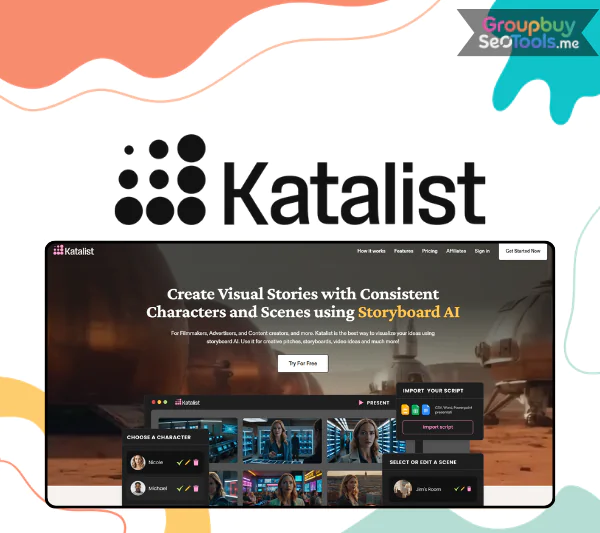
Modern, easy-to-use Katalist AI homepage interface
Katalist AI is a platform that applies advanced artificial intelligence to the process of creating storyboards – visual scripts. Instead of spending hours, even weeks, creating each scene, Katalist helps you shorten the process to just a few minutes.
Katalist is like a magic wand for video creators, including filmmakers, advertisers, YouTubers, and companies looking to more effectively communicate their brand messaging. It can automatically evaluate, comprehend context, and turn words into graphics.
Key features of Katalist AI
Here are the core features that make Katalist different in the world of creative tools:
With only one click, turn a script into a storyboard: All you have to do is submit your script—in Word, PowerPoint, CSV, or straight paste—and it will be transformed into a comprehensive storyboard with distinct scenes and logical layouts in a matter of seconds. There will be no more intermediate steps or hand-drawing every frame. “One click and done” applies to everything.
Automated analysis: character to action: AI is used by Katalist to read and comprehend the script, recognizing every character, location, action, and behavior. It ensures continuity throughout the entire plot by not just identifying names but also comprehending each character’s role and position in each scene.
Four times the speed of production: With Katalist, you may finish a storyboard for a movie or commercial production in a matter of days instead of weeks or even months. Everything is smooth and uninterrupted, from drafting the script to making the storyboard, and from storyboard to video.
A storyboard becomes a video: The “magic” behind it is Katalist Video Studio. You may turn your storyboard into a video with sound effects, music, and voiceover. For YouTubers, documentary filmmakers, or production teams who need to demo before actually shooting, this is a very helpful tool.
Easily control the entire scenario: You may quickly and easily alter the scene, camera angle, lighting, or composition of every frame with the help of the Dynamic Scene Generation function. It only takes a few easy changes to transform a scene’s mood from joyful to tense, from day to night.
Use the Character Posing tool to personalize the pose of your character: You have a lot of versatility and depth when it comes to customizing each character’s position. You can raise your hand, bow, sit, stand, or jump. As a result, the narrative becomes far more vivid, intimate, and authentic rather than stiff.
How does Katalist AI work?
Step 1: Write or upload a script
Simply click “Get Started” on the Katalist page to reach the AI Script Assistant section. You can enter a brief concept or compose your own script here. “An unforgettable family trip” is one example. After selecting “Generate Script,” Katalist will produce a comprehensive, very coherent script that is broken up into scenes in roughly ten seconds.
With a single click, you may add, remove, or entirely alter each area.
Step 2: Choose an image style
Katalist lets you select a visual style that complements the tone of the text once you are happy with the prose. Up to ten distinct settings are available, including:
Cinematic (movie),
Sketch (hand sketch),
Comic book (comic book),
Pixel art, Video game, Animation,…
You can upload three to five reference photos for Katalist to build a distinctive design with your own mark if you’d like it to be more customized.
Step 3: Customize the character – from face to outfit, voice
In this step, you will see each main character appear: for example John, Jane, Tom and Emma. Each character can change their appearance, facial expression, clothes… and especially: voice. There are dozens of voices for you to choose from for each character, ensuring the most realistic emotions for your story.
All of this is done directly on the Katalist interface, no installation or external software required.
Step 4: Create a storyboard and fine-tune each frame
After clicking “Create Project”, Katalist will automatically convert the script into a storyboard, place the characters in the correct context, determine their position in the frame, and create a continuous sequence of scenes. Here, you have complete artistic control over every frame:
Change characters or add new ones
Edit backgrounds, props, lighting, composition
Customize camera angles: close-up, wide shot, POV, side or back shots
Choose location or upload your own images
Step 5: Detailed customization – where Katalist really shines
As you click on each frame, Katalist opens up 2 panels:
Left panel: Character Posing Tool – allows you to change the character’s pose such as raising your hand, bowing, jumping, etc. “Repositioning” characters in a photo is now a matter of seconds.
Bottom panel: This is where you can edit the prompt for each frame, choosing which characters will appear, what background to use, and what kind of camera angle you want.
Also:
Image Crop Tool: cuts out unwanted parts of the image.
Generative Fill Tool: adds details – for example, you can choose to “remove tall buildings” and replace them with “blue sky”.
Add Image Tool: adds images from your computer to insert into the shot.
Step 6: Convert the storyboard into a video with action and dialogue
Once you have completed the storyboard, you can switch to Video Mode. Here, there are 2 ways to “breathe life” into the image:
Action: you describe the action you want the character to perform (for example: “the main character points to the sky”). Katalist will generate a 5–10 second clip accordingly.
Dialogue: you type in your dialogue, and the AI will generate a clip with accurate lip-sync, making it feel like a real character is talking.
You can preview, edit, and when you’re satisfied – just hit “Generate” to publish the finished video frame by frame.
Where to buy Katalist AI Unlimited accounts at cheap prices?
Our GroupbuySeoTools shop is a must-visit if you’re searching for a reliable source to purchase Katalist AI Unlimited accounts at competitive pricing. In order to help you save millions of dong each month, we currently offer a shared bundle of licensed Katalist AI accounts at a low cost that is nevertheless packed with premium capabilities.
With this account, you will experience all the great creative features that a professional user needs, including:
All creative features
Runway Gen-4 & Google Veo 2 integrated
Super smooth lip-syncing
Unlimited image credits
Unlimited projects
Style & Unlimited Personalized Characters
AI Script Assistant – Smart Script Writing Assistant
Consistent Characters Throughout Video
High-Quality AI Voice
Deep-Depth AI Photo Editor
Integrated with Adobe Premiere Pro
Real-Time Team Collaboration
ZIP & PowerPoint (.PPT)
Unlike other free versions, you can utilize all of the aforementioned capabilities without worrying about credits or feature limitations because they are all completely activated.
Why should you choose to upgrade your Katalist AI Unlimited account at GroupbuySeoTools?
In addition to selling accounts, GroupbuySeoTools offers a simple, reliable, and secure user experience. Thousands of consumers have selected and trusted our store for the following reasons:
Reputable, open, and committed assistance: We promise to deliver accounts promptly, as stated, with thorough instructions and one-on-one support via Facebook, Zalo, or Telegram if you run into any issues while using them.
Cost reductions at the lowest pricing available: Because shared account packages at GroupbuySeoTools are only 5–10% more expensive than purchasing directly from Katalist, you can readily acquire this potent tool without having to make a big investment.
Constant updates: don’t worry about locking: Our expert account management system is updated and maintained on a regular basis to help you use it steadily and reduce the chance of disruptions.
Instructions and video tutorials are available: The admin team frequently updates comprehensive guidelines, the newest techniques, and advice on how to get the most out of Katalist to create original videos that become viral on TikTok and YouTube.
Who is Katalist AI Unlimited suitable for?
This account package is extremely suitable for:
YouTube, TikTok, Instagram Reels content creators
Those who make documentaries, short animations
Marketers who want to create quick, beautiful video ads
Startups making MVP products, demoing ideas
Freelancers who want to take on AI video editing jobs for customers
Teachers, lecturers making creative lecture videos
Students majoring in communications, graphics, information technology
In other words, anyone who wants to save time and money while still creating high-quality image – video products can use Katalist AI Unlimited effectively result.
Some frequently asked questions about Katalist AI accounts at GroupbuySeoTools
❓Is a shared account safe?
→ Indeed. In order to prevent user conflicts and the disclosure of personal information, we employ a specific account system with a clear flow.
❓Can I use it on multiple devices?
→ It is compatible with all browsers on PCs and phones. To prevent being logged out, you should only use one device at a time.
❓Are there any feature limitations?
→ No. All of the Unlimited version’s features, such as photo editing, video exporting, and character creation tools, are available to you.
❓How long does it take to receive an account?
→ Instructions and login credentials will be mailed to you within 5 to 10 minutes after payment.
Conclusion
With GroupbuySeoTools inexpensive Katalist AI Unlimited shared account purchase option, you should be able to affordably acquire this really potent AI tool.
Katalist AI is a fantastic place to start if you want to make eye-catching, imaginative movies, track social media trends, or even make money off of your own material.
Let AI transform your thoughts into vivid sights and noises right now to avoid them being in your head forever!
👉 To get account bonuses right now, visit GroupbuySeoTools and send an email to the fan page!
 Google
 Microsoft
 Adobe
Adobe Canva
Canva Kaspersky