Google
 Microsoft
 Adobe
Adobe Canva
Canva Kaspersky
Kling AI
Price range: $15.00 through $35.00

Price range: $15.00 through $35.00
Sent via customer’s email
12-24hrs
All-in-one Subscription
Kling AI – AI tool that creates videos and images from simple text descriptions in minutes
Official website: https://klingai.com/global/
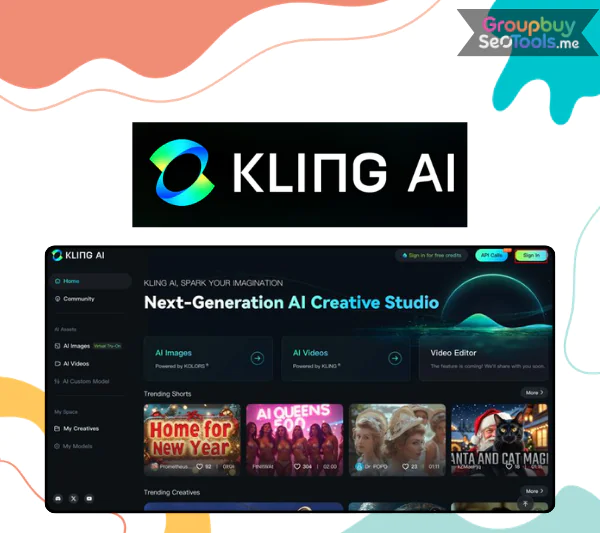
Artificial intelligence’s quick rise has completely changed the way people create. Kling AI, a new tool created by the Chinese tech giant Kuaishou, is one of the newest innovations. Not long after OpenAI released Sora for turning text into videos, Kling AI came out as a strong option that got a lot of attention around the world.
Kling AI gives creators, marketers, and regular people new options by turning written prompts into moving videos and still pictures into motion clips that look like real life. We’ll talk about how this technology works, what makes it unique, and why so many people are interested in it here.

Kling AI platform showcasing AI-powered video creation from text prompts.
Kling AI is a powerful AI-driven creation tool that lets users make videos and pictures from written descriptions. This makes it simple to turn creative ideas into high-quality visual content.
In addition to writing text, Kling AI can animate still photos to make characters move in a way that looks realistic. The system was made by Kuaishou and uses advanced Diffused Transformer architecture, which is cutting-edge AI technology that can render detailed images at resolutions of up to 1080p while correctly modeling complex motion and environmental elements.
To put it simply, Kling AI gets rid of many of the usual problems that come up when making videos. Users can describe what they want to see and let the system build the visuals for them instead of filming scenes, editing footage, or hiring big teams.
Kuaishou is one of China’s biggest tech companies. It was formed in 2011 and has its main office in Beijing. The company first became known around the world through its social platform for short videos, which has millions of people all over the world.
As AI got better, Kuaishou grew to include more than just fun and social media. The launch of Kling AI is in line with the company’s larger goal of giving anyone the tools they need to make complicated digital content without having to know a lot about technology.
By using advanced deep learning models, Kling AI can accurately simulate things like lighting, depth of the surroundings, and how people move. The platform is different from many other AI tools because it pays attention to physical details, which gives generated movies a sense of realism.
Since it was released to the public in June, Kling AI has gotten a lot of attention from developers, artists, and tech fans. A free version has also been made available so that people can try out the artistic features of the tool for themselves.
The features that Kling AI provides make it easier to create content while still keeping high visual quality.
More and more people are interested in videos made by AI, which shows a larger change in digital creation. Tools like Kling AI lower the barriers to production, making it easier for people and companies to tell stories visually.
AI-generated video technology makes it easier and faster to make content for everything from marketing efforts to educational materials and social media stories. Kling AI is one of the most talked-about new platforms in this area because it strikes a good balance between quality, realism, and usability.
AI is always getting better, and platforms like Kling AI show how quickly creative workflows are changing. These platforms also make high-level content creation easier for people all over the world.
| Features | Basic | Standard | Pro | Premier | Ultra |
|---|---|---|---|---|---|
| Price | $0 (Free Forever) | $79.2 / Year | $293.04 / Year | $728.64 / Year | $1429.99 / Year |
| Monthly Credits | No monthly credits | 660 Credits | 3000 Credits | 8000 Credits | 26000 Credits |
| Cost per 100 Credits | N/A | As low as $1 | As low as $0.81 | As low as $0.76 | As low as $0.46 |
| Images per Month | Limited (30 elements) | 3300 Images | 15000 Images | 40000 Images | 130000 Images |
| 720p Videos per Month | Not included | 33 Videos | 150 Videos | 400 Videos | 1300 Videos |
| 1080p Video Generation | No | Yes | Yes | Yes | Yes |
| Queue | Standard | Unlimited Tasks | Unlimited Tasks | Unlimited Tasks | Unlimited Tasks |
| Fast Track Generation | No | Yes | Yes | Yes | Yes |
| Image Upscaling | No | Yes | Yes | Yes | Yes |
| Brand Watermark Removal | No | Yes | Yes | Yes | Yes |
| Video Extension | No | Yes | Yes | Yes | Yes |
| Commercial Use | No | Yes | Yes | Yes | Yes |
| Priority Access to New Features | No | No | Yes | Yes | Yes |
| Beta Test Invitations | No | No | No | No | Yes (if applicable) |
GroupbuySeoTools is a great option if you want to buy a Kling AI account from a reliable source without having to pay too much or risk having shaky access. For just $21 a month, you get a real Kling AI Pro personal account that is made for stable, long-term use. This is better than shared logins that often get limited or lose features.
This is not a setup with limited access. It’s a full-featured Pro account that gives you access to advanced creative tools that let you make professional movies made by AI without any breaks.
To put it simply, you get a powerful AI video creation tool that is tailored to your own process for a lot less money than if you signed up directly with the official provider.
It can be difficult to find the right place to buy AI tools. GroupbuySeoTools stands out because it is reliable, honest, and has a long history of trust in the SEO and AI communities.
The buying process is straightforward and beginner-friendly:
The entire process typically takes less than 10 minutes, giving you immediate access to a professional AI video creation platform.


After generation is complete, preview the result. If satisfied, click the download icon to save the file to your device.
Kling AI also supports mobile access through companion apps available on the App Store (iOS) and Google Play (Android). Search for “Kwaiying” or “KwaiCut” to install.
Note: Free accounts are limited to 5-second videos and include a watermark. Upgrading removes these restrictions.
Strong video material often speaks louder than text alone in today’s digital world. Creators, marketers, and business owners can use Kling AI to make their visual ideas come to life without having to use complicated editing tools.
If you choose GroupbuySeoTools, you’ll get cheap entry, reliable service, and ongoing help. This is a good place to start if you want to improve your content strategy with AI-driven video creation. With Kling AI at GroupbuySeoTools, you can start making powerful AI movies right away.
| Plan | Pro, Standard |
|---|---|
| Time | 1 Month |
There are no reviews yet.