Google
 Microsoft
 Adobe
Adobe Canva
Canva Kaspersky
TurboScribe AI
$61.00

$61.00
Sent via customer’s email
12-24hrs
All-in-one Subscription
TurboScribe AI – a place that completely solves the problem of recording – transcribing with dizzying speed, amazing accuracy and language support capabilities
Official website: https://turboscribe.com/
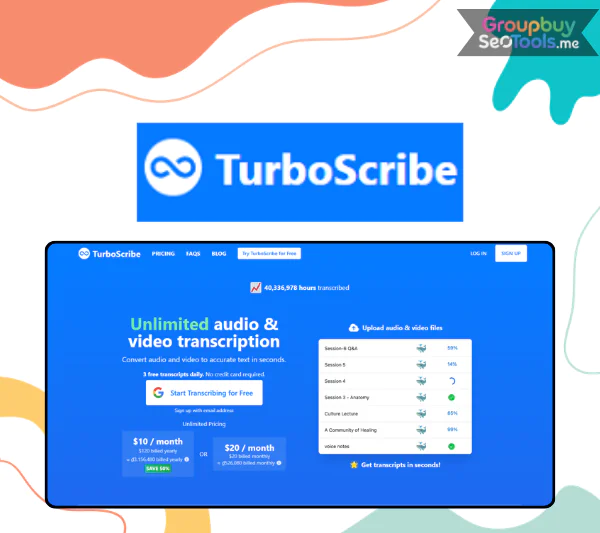 TurboScribe AI is an AI-powered transcription tool that uses OpenAI’s Whisper model to convert audio and video files into accurate, structured text. It supports 98+ languages, claims up to 99.8% accuracy on clear English audio, and is built for anyone who regularly needs to turn recordings into searchable, editable, shareable text at scale.
Key facts at a glance:
This guide is written for podcasters and YouTubers who want to repurpose audio into written content, professionals and agencies managing large volumes of meetings and calls, academics and researchers transcribing interviews or lectures, legal and medical teams building internal documentation, and anyone comparing TurboScribe against tools like Otter.ai, Rev, and Descript.
The review that follows is balanced and hands-on in style, drawing on official TurboScribe documentation, public pricing pages, and real-world testing scenarios. Exact prices and features change over time, so always verify current details at TurboScribe’s official website before purchasing.
TurboScribe AI is a web-based tool that takes an audio or video file, sends it through OpenAI’s Whisper speech recognition model, and returns a clean, formatted transcript. You upload a file, select your language preferences, and within minutes you have a readable document you can edit, export, or share.
The outputs go beyond raw text. Depending on your plan, TurboScribe can return a transcript with speaker labels, timestamps, an AI-generated summary, chapter headings, extracted action items, and a glossary of key terms. You can export the result in multiple formats for different use cases: a DOCX for editing, an SRT file for adding captions to a video, or a PDF for archiving.
A few clarifications worth making upfront:
A simple before-and-after: upload a 60-minute Zoom recording, receive a formatted transcript with speaker labels, a three-paragraph executive summary, and a bulleted list of action items, ready within a few minutes.

Who may not be well served: those who need live or real-time captions during a meeting or event, and those who need 100% human-verified transcripts for legal proceedings or broadcast compliance. Human transcription services like Rev’s human tier remain the better choice for those requirements.
TurboScribe’s workflow is straightforward and the same regardless of your use case:
Processing speed is influenced by file length, audio quality, and current server load. In typical conditions, one hour of audio processes in three to five minutes.
| Feature | What It Does | Why It Matters | Free / Pro / Enterprise |
| Multilingual transcription | Supports 98+ languages | Global teams, multilingual content | All tiers |
| Auto language detection | Identifies language automatically | Saves manual selection step | All tiers |
| Speaker diarization | Labels who said what | Essential for interviews and meetings | Pro and Enterprise |
| Timestamps | Marks time of each segment | Navigation, caption sync | All tiers |
| AI summaries | Generates executive summary and key points | Quick recap without reading full transcript | Pro and Enterprise |
| Chapter generation | Breaks long recordings into titled sections | Podcast/video navigation, long meetings | Pro and Enterprise |
| Action item extraction | Identifies tasks and decisions | Meeting productivity | Pro and Enterprise |
| Glossary and keywords | Highlights repeated terms and jargon | Study aids, SEO, domain indexing | Pro and Enterprise |
| Export formats | TXT, DOCX, PDF, SRT, VTT, and more | Flexibility for different workflows | All tiers (some limits on Free) |
| Integrations | YouTube, Google Drive, Dropbox, Zoom | Reduces manual file transfer steps | All tiers |
| Batch uploads | Queue multiple files simultaneously | High-volume workflows | Pro and Enterprise |
| Project organization | Folders and project grouping | Team management and archive | Pro and Enterprise |
| Collaboration | Shared access and team features | Agencies and enterprise teams | Enterprise |
The free tier covers the fundamental upload-to-transcript workflow with basic exports but restricts advanced AI features and daily volume. Pro unlocks the full AI feature set, higher file size limits, and faster processing priority. Enterprise adds data controls, team collaboration, and custom terms for compliance-sensitive organizations.
The real productivity multiplier in TurboScribe is not the transcription itself but the layer of AI analysis applied on top of it.
Auto-summaries come in two forms: a short executive summary paragraph that captures the main topic and outcome of a recording, and a bulleted list of key takeaways that you can paste directly into meeting notes or a show description. For a 45-minute product strategy call, the summary might read: “The team aligned on Q2 priorities, agreed to delay the API feature to Q3, and assigned three action items to engineering.” That level of extraction saves significant time for anyone who would otherwise need to re-listen or read the full transcript to capture the same information.
Chapter generation breaks long recordings into titled sections with timestamps, making them navigable. For a two-hour podcast, chapters might read: “Introduction and guest background,” “Deep dive on SEO strategy,” “Tool recommendations,” and “Closing thoughts.” This maps directly to YouTube’s chapters feature and to podcast show note conventions.
Action item extraction identifies decisions and assigned tasks from meeting recordings. A standard output looks like a numbered list: “1. Sarah to send the updated brief by Friday. 2. Dev team to scope API timeline by end of sprint. 3. Marketing to draft two campaign variants for review.” This output alone replaces what many teams spend 20 to 30 minutes producing manually after each meeting.
Glossary and keyword extraction highlights recurring terms, proper nouns, and domain-specific language. For researchers, this creates a fast reference of the concepts covered. For SEO-focused content teams, it surfaces the terms that naturally appear throughout a transcript and should be reinforced in written content.

For content creators, TurboScribe fits into a standard post-production workflow. After recording an episode, the audio is uploaded to TurboScribe, which returns a transcript, a summary, and optionally chapter titles within minutes. From there, the transcript becomes the raw material for multiple content assets:
A creator producing a weekly 60-minute show saves two to three hours of writing and manual note-taking each week by running the episode through TurboScribe before touching any other post-production step. Over a year, that is more than 100 hours recaptured for content strategy, audience engagement, or additional production.
The SEO benefit of captions and indexed transcript content is an added compounding return that many creators underestimate until they see organic search traffic arriving from episode-specific long-tail queries.
For business teams, the core value is converting unstructured meeting recordings into structured, searchable documentation. Internal meetings become a record of decisions with extracted action items. Sales calls become training material that new team members can review without sitting in on live calls. Webinars become multiple content assets: a transcript for accessibility, a blog post for SEO, a highlights clip script for social media, and gated content for lead generation.
The consistency benefit is often underappreciated. Manual meeting notes vary in quality and completeness by whoever takes them. TurboScribe produces a consistent output regardless of who ran the meeting, creating a reliable knowledge base that can be searched and referenced months later.
For a sales team running 20 discovery calls per week, TurboScribe replaces the manual note-taking workload entirely and creates a searchable archive of every conversation, which is valuable for identifying common objections, successful pitches, and training patterns.
Graduate students conducting qualitative research typically accumulate dozens of interview recordings that require transcription before analysis can begin. At human transcription rates of $1 to $2 per minute, 20 one-hour interviews represent $1,200 to $2,400 in transcription costs. TurboScribe completes the same work at a fraction of the cost with accuracy sufficient for qualitative coding.
Lecturers who record their sessions can use TurboScribe to produce accessible transcripts for students who prefer reading, need closed captions for accessibility compliance, or are reviewing material in a language that is not their first. The summarization and glossary features add value as study aids, condensing a 90-minute lecture into a structured revision document.
Language learners use TurboScribe to generate transcripts of content in their target language, which they then study alongside the audio to build reading and listening comprehension simultaneously.
TurboScribe can serve as a draft transcription layer in legal and medical contexts with the right framing and process design. A lawyer using it for internal call notes, a medical professional drafting a consultation summary, or a compliance team building a first-pass record of a regulatory call can all benefit from the speed and accuracy of AI transcription.
The essential caveats:
| Dimension | TurboScribe | Otter.ai | Rev (AI) | Descript |
| Model type | AI (Whisper) | AI (proprietary) | AI and human | AI with editing suite |
| Starting price | ~$10/mo (annual) | ~$17/mo (annual) | ~$0.25/min (AI); ~$1.50/min (human) | ~$24/mo |
| Accuracy (clean audio) | 99 to 99.8% | 95 to 98% | 99%+ (human), 95 to 97% (AI) | 95 to 98% |
| Languages | 98+ | English-primary | English-primary (human); some AI languages | English-primary |
| File size limit | Up to 10GB (higher tiers) | Limited on free/lower tiers | Per-file pricing model | Plan-dependent |
| Real-time transcription | No | Yes | No (upload-only for AI) | No |
| Speaker identification | Yes | Yes | Yes (human); limited (AI) | Yes |
| AI summaries | Yes | Yes | Limited | Yes |
| Subtitle/caption export | SRT, VTT | SRT | SRT, VTT | SRT, integrated editor |
| Primary strength | High volume, multilingual, cost | Live meeting notes | Human accuracy | Editing and production |
Pricing and features listed are based on publicly available information as of 2026 and are subject to change. Always verify current pricing on each tool’s official website.

Choose TurboScribe if you are processing large volumes of pre-recorded audio or video, want the lowest cost per hour of transcription at high accuracy, need strong multilingual support, or are a solo creator or small team that does not need live meeting notes.
Choose Otter.ai if your primary use case is live meeting transcription and note-taking. Otter integrates with calendar apps and can join meetings automatically to produce live notes, which is a capability TurboScribe does not currently offer.
Choose Rev human transcription if you need near-perfect accuracy for legal, broadcast, or compliance-sensitive content where errors are not acceptable and human review is built into your workflow budget.
Choose Descript if transcription is one part of a broader audio and video production workflow. Descript combines transcription with a multi-track editor that lets you edit audio and video by editing the text transcript, which is a fundamentally different product category than TurboScribe.
Example scenarios: a remote product team that meets via Zoom daily and wants automatic live notes is better served by Otter. A YouTuber with a back catalog of 200 unlabeled podcast episodes who wants transcripts for SEO and show notes will get better value from TurboScribe. A law firm needing certified transcripts of depositions should use Rev’s human tier.
User sentiment on review platforms is generally strong, with frequent mentions of speed, accuracy, and the summaries feature as standout positives. Common praise clusters around the time savings versus manual transcription and the multilingual capability.
Most of these limitations are manageable with workflow adjustments: recording quality choices, manual review habits, and appropriate use of the paid tier. They are worth knowing before committing to TurboScribe as a core business tool.
Is TurboScribe AI free to use?
Yes, there is a permanently free tier that allows up to three transcriptions per day. Higher-tier features including AI summaries, chapters, and advanced exports require a paid plan starting at approximately $10 per month on annual billing.
Does TurboScribe have an unlimited plan?
Yes. TurboScribe offers plans branded around high-volume or unlimited transcription. Check the current pricing page for the specific plan names and limits, as these have evolved over time.
Does TurboScribe support my language?
TurboScribe supports 98+ languages through Whisper’s multilingual model. Major world languages including Spanish, French, German, Portuguese, Japanese, Chinese, Arabic, and Hindi are well supported. Accuracy in less-resourced languages may be lower; test with a sample file if your language is not a major one.
Can I use TurboScribe for sensitive or confidential recordings?
You can, with appropriate precautions. Review TurboScribe’s data retention and privacy policies for your tier. Enterprise users should inquire about data processing agreements if handling personally identifiable information or content under HIPAA, GDPR, or similar frameworks.
Does TurboScribe offer real-time or live transcription?
No. TurboScribe is an upload-based batch transcription tool. If you need live captions during a meeting or event, Otter.ai or similar meeting-focused tools are better suited.
Can I cancel my subscription at any time?
Yes. TurboScribe subscriptions can be cancelled at any time. Always confirm current billing terms, including whether the cancellation takes effect immediately or at the end of the billing cycle, on the official website.
How accurate is TurboScribe compared to human transcription?
On clean English audio with a single speaker, TurboScribe reaches 99 to 99.8% accuracy, which is close to professional human accuracy for the same conditions. Human transcription still has an edge in challenging audio, highly specialized terminology, and contexts where certification or legal defensibility is required.
Does TurboScribe integrate with Zoom, Google Drive, and YouTube?
Yes. TurboScribe supports direct import from YouTube URLs, Google Drive, Dropbox, and Zoom recordings. This reduces the friction of downloading and re-uploading files between tools.
Does TurboScribe work on mobile?
Yes, TurboScribe has mobile access. Core transcription workflows are functional on mobile, though advanced features and exports are most comfortably managed on a desktop browser.
Is there an API for developers or enterprises?
TurboScribe offers API access for developers looking to integrate transcription into their own applications. Contact TurboScribe directly or check the developer documentation for current API availability, pricing, and rate limits.
Are my files used to train the AI?
TurboScribe’s stated policy is that uploaded files are not used to retrain the AI model. Verify the current data policy on TurboScribe’s privacy documentation, especially if this matters for your organization’s compliance requirements.
Can I get invoices for business accounting?
Yes. Paid plan subscribers can access invoices through their account dashboard. Enterprise customers can arrange custom billing and invoicing terms directly with the TurboScribe team.
TurboScribe AI delivers on its core promise: fast, highly accurate, multilingual transcription at a price point that makes high-volume use genuinely accessible. For podcasters, YouTube creators, business teams, researchers, and agencies who regularly need to convert audio and video into structured text, it is one of the most practical tools in the category.
If you are evaluating whether TurboScribe fits your workflow, start with the free tier to test accuracy on a representative sample of your actual audio, then assess whether the paid AI features would change how you use the transcripts. For most users who reach that test, the answer is clear.
| Time | 1 Year |
|---|
There are no reviews yet.