Google
 Microsoft
 Adobe
Adobe Canva
Canva Kaspersky
VoiceInk Team
$16.00

$16.00
Sent via customer’s email
12-24hrs
All-in-one Subscription
VoiceInk is an app that uses local AI models to convert your speech into text with near-perfect accuracy, in seconds – and completely offline.
Official website: https://www.voiceink.cc/
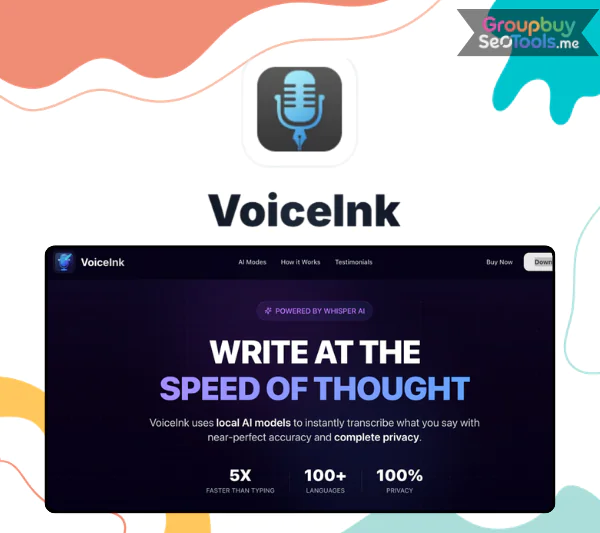
VoiceInk is an app that uses local AI models to turn your words into text very quickly and accurately, even when you’re not online.
VoiceInk’s creators made the app with a very useful goal in mind: to save time. And the results are great: he saved up to 26 hours of work a month, which is more than 1.5 hours a day. VoiceInk is the result of strong AI technology, design that works best for Mac users (Apple Silicon), and a commitment to open source to make sure everything is clear.
It’s not enough to just list VoiceInk’s benefits and leave them at that. This is the idea behind every part of the app: to help you work less and get more done.
VoiceInk uses strong AI models that are built right into your device. This makes it possible to convert speech to text almost instantly and with up to 99% accuracy. There is no lag, no internet link, and no chance that data will get lost. The app listens, knows, and writes down everything you say, right down to the intonation, rhythm, and even the most complicated sentences.
VoiceInk does all of its work on your computer, unlike other speech transcription tools that send data to servers. This means that your voice, text messages, and private data will always be on your computer. In a world where private is being invaded more and more, VoiceInk is a welcome change because you have full control.
VoiceInk works anywhere, from Gmail, Slack, and Notion to chat apps like ChatGPT that are driven by AI. You can make VoiceInk work with a shortcut, and then the software will record what you say and paste it where the mouse is in any app.
VoiceInk can do more than just take notes. It can also turn into a super-powerful AI helper. “Hey Assistant, help me plan today,” you can say, and a clear to-do list in markdown format with checkboxes will show in a few seconds. Everything goes as easily as if you were talking to a smart coworker.
VoiceInk works with over 100 languages, and you can make your own “personal dictionary” with your own words, proper names, and specific terms. This makes the conversion from voice to text a lot more accurate. You can also change how the application formats the output. For example, you can add punctuation, split text into sections, or format it to fit a specific structure, like emails, notes, or presentations.
The VoiceInk experience is seamless – from installation to daily use. Here’s how it works in action:
You can’t get VoiceInk from the App Store; you’ll have to get the.dmg file from the VoiceInk site. If your Mac gives you a security warning, you’ll need to click “Open Anyway” because it hasn’t been approved by the Apple Developer Program yet.
Once you open the app, you’ll be guided step-by-step through:
You can hold a key (e.g. Option) to record – just hold to speak, release to stop, and after a few seconds, the text will appear right at the cursor position. It feels as natural as talking to your computer.
Just start with “Hey Assistant”, you can ask for suggestions, professional content writing, even advice. For example: “Hey Assistant, help me write an email asking for leave next Friday” – and you will receive a complete, grammatically correct, polite and professional email.
Many people will ask: “How is VoiceInk different from other voice-to-speech software like Google Dictation or existing AI utilities?”. The answer lies in three core points:
These are the things that make VoiceInk no longer a tool, but an extension of human thinking.
VoiceInk Team accounts are only $16 for a one-time payment that lets you use them for life. You don’t have to pay monthly fees or do changes by hand; all upgrades are available to you for as long as the software is supported.
In particular, the account at GroupbuySeoTools is a fully licensed Team type that can be used on a personal computer. It is stable and doesn’t have any restrictions on what it can do like some cracked or stolen versions do.
You can buy a tool for just $16 that will save you dozens of hours of typing every month. This will speed up everything, from writing articles and emails to taking notes and talking with AI.
There is no shortage of places selling licensed software, but what makes GroupbuySeoTools the top trusted choice in the SEO and AI community?
Many people don’t need a tool like VoiceInk, but people who write, record voices, or need to get work done quickly will find it very useful.
1. Is the account purchased at GroupbuySeoTools different from the official purchase?
The functions, updates, and safety are all the same. The main difference is that it costs a lot less and comes with dedicated help.
2. Can I use it on multiple devices?
At the moment, GroupbuySeoTools VoiceInk Team account only works with one device, which is fine for single users. You can ask us for help finding a good way to use it on more than one device if you need to.
3. Will the account be locked when used?
Not at all. This account is legal and hasn’t been hacked or used to get around the law. You can be sure that it will last a long time.
4. What if I don’t know how to install it?
Do not worry! The GroupbuySeoTools team will help you every step of the way and can even do it from afar if you need to.
5. Can I get a refund if it doesn’t work?
We always give error correction support top priority, but if it still doesn’t work after you’ve followed the steps exactly, you may be given a new account or a refund, depending on the case.
At GroupbuySeoTools, you can get a licensed VoiceInk Team account for just $16. This account gives you unlimited updates and help for life. You can message the GroupbuySeoToolsfan page and get an account in 5 minutes. For more information, go to the main website.
There are no reviews yet.