Bolt.new is a tool driven by AI that helps people quickly turn their ideas into web apps that work. Based on real-life use, here is a clear breakdown of its major pros and cons.Let’s use GroupbuySeoTools to look into it!
What Is Bolt.new?
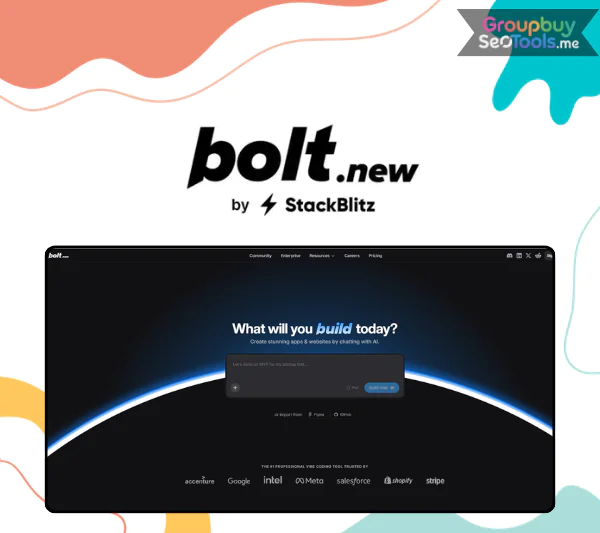
Bolt.new interface displayed in a web browser, showing AI-assisted code generation and live preview
Bolt.new is not like other AI code tools in a lot of ways. As a browser-based development partner, it’s always ready to help you turn your written ideas into real apps, from a simple landing page or personal blog to a full-stack web app that does everything you need it to do.
There’s no trouble with setting it up. You don’t have to set up local settings, deal with dependencies, set up Git, or work hard with build tools. Bolt.new gives you a full working environment right in your browser, using cutting-edge WebContainers technology. To build, all you need is a clear idea and the drive to do it.
Key Features That Set Bolt.new Apart
Build Full-Stack Apps Directly in the Browser
This is where Bolt.new feels really different. Developers can use StackBlitz’s WebContainers to work completely online while still having the freedom of a local setting.
Write and edit code without installing a traditional IDE.
Add npm packages such as React, Vite, or Tailwind with ease.
Run a Node.js server directly inside the browser.
Use a built-in terminal for debugging and system control.
Everything is done on the web, so it works quickly even if your computer doesn’t have the latest gear.
Full-stack development workflow running entirely in Bolt.new using WebContainers
An AI Coding Partner That Works With You
Bolt.new is more than just a place to write code; it’s also a place where people can work together and talk to AI directly. Just write down what you want to build, like this: “Make a simple note-taking app with a clean interface, email login, and Supabase storage.”
From there, Bolt.new automatically:
Generates a logical project structure.
Configures Supabase as the backend.
Designs the frontend layout.
Deploys a live preview almost instantly.
Behind the scenes, the “enhance prompt” feature also improves your directions. This helps the AI produce results that are not only useful, but also well-designed and easy to use.
Support for Modern Development Technologies
It’s clear that Bolt.new was made with today’s web developers in mind. A lot of well-known tools and systems are supported:
Frontend: React, Vue.js, Next.js, Astro, Tailwind CSS, ShadCN, and more.
Backend: Native Node.js with file system access, APIs, and routing.
Database: Supabase and Firebase, including authentication, storage, and edge functions.
Build & deployment: Vite and Netlify for fast production-ready releases.
You can find almost everything you need on Bolt.new, whether you want to learn web development or get an MVP out the door quickly.
Seamless Integration With External Services
Modern applications rely on strong third-party services, and Bolt.new integrates them smoothly:
Supabase: A complete backend-as-a-service for databases, authentication, and storage.
Stripe: Add payment functionality with minimal configuration.
Netlify: Deploy projects in just a few clicks.
Figma (Anima): Convert Figma designs into React or HTML code automatically.
GitHub: Manage versions, backups, and collaboration.
Expo: Extend web projects to mobile platforms efficiently.
All integrations are designed to work together smoothly, saving both time and effort.
How to use Bolt.new ?
Using Bolt.new is surprisingly easy to get started with. Here is a quick summary to help you understand how things work.
Step 1: Sign In and Create a Workspace
Visit https://bolt.new, log in using your Google or GitHub account, and create a new project. An IDE-style interface appears instantly, complete with a terminal, file system, live preview, and an AI chat panel.
Step 2: Describe What You Want to Build
Example prompt entered into Bolt.new showing AI generating a blog application
Enter a request such as:
“Build a basic blog with a homepage, individual post pages, search functionality, and Supabase data storage.”
Within moments, Bolt.new creates core files like index.tsx, post.tsx, and supabase.js, while the interface begins to render live.
Step 3: Refine and Expand
You can continue interacting with the AI to improve your project:
“Add dark mode using Tailwind CSS.”
“Include a comment system for each post.”
Updates happen in real time, and if you run into obstacles, the AI can suggest fixes or improvements instantly.
Step 4: Deploy and Share
When everything looks good, simply request deployment:
“Deploy this project using Netlify.”
Bolt.new packages the app, connects to Netlify, and publishes it. Within minutes, you’ll have a live URL ready to share with teammates, clients, or investors.
Bolt.new Pricing
Start for free and upgrade as your needs grow. Compare Bolt.new plans below to find the best fit for individuals, teams, and enterprises.
Features
Free
Pro (Popular)
Teams
Enterprise
Price
$0
$25 / month
billed monthly
$30 / month / member
billed monthly
Custom pricing
Projects
Public & Private
Public & Private
Public & Private
Public & Private
Token Limits
300K daily
1M monthly
No daily limit
Starting at 10M monthly
No daily limit
Starting at 10M monthly
Custom, scalable limits
Unused Token Rollover
No
Yes
Yes
Yes
Branding on Websites
Bolt branding required
No Bolt branding
No Bolt branding
No Bolt branding
File Upload Limit
10MB
100MB
100MB
Custom
Website Hosting
Included
Included
Included
Included
Web Requests
Up to 333K
Up to 1M
Up to 1M
Custom, high volume
Databases
Unlimited
Unlimited
Expanded capacity
Unlimited
Expanded capacity
Unlimited
Enterprise-grade scaling
Database Provider Choice
No
Yes
Yes
Yes
Custom Domain
No
Yes
Yes
Yes
SEO Boosting
No
Yes
Yes
Advanced SEO support
AI Image Editing
No
Yes
Yes
Yes
Team & Access Management
No
Basic sharing
Team-level access
Admin controls
Advanced admin & user provisioning
Security & Compliance
Standard
Standard
Enhanced
SSO, audit logs, compliance support
Support
Community support
Standard support
Priority support
Dedicated account manager
24/7 priority support
Best For
Individuals & testing
Creators & professionals
Growing teams
Large teams & enterprises
How Much Does a Bolt.new Pro Account Cost?
Bolt.new Pro pricing overview with highlighted premium features
You can get to a Bolt at GroupbuySeoTools.You can get a new Pro sharing account for only $66 a year. This price is set up so that users can try out a premium development tool without having to pay a high subscription fee.
With Bolt.new Pro, you gain:
Private project creation and management, ideal for personal products or unreleased startup ideas.
Higher file upload limits, making it easier to work with images, datasets, or Figma assets.
No daily token restrictions, allowing unlimited AI interactions and complex code operations.
Token rollover, so unused credits carry over to the next month instead of being wasted.
Bolt.new Pro gives you a modern coding environment, strong AI support, and fast deployment options for about $6 a month. This lets you build and start projects as quickly as an experienced developer.
Why buying Bolt.new Pro from GroupbuySeoTools makes sense
Yes, it is important to have good tools. But coders care most about how reliable and safe their work is. Indeed, this is the main reason why more and more developers and creators pick GroupbuySeoTools as their main base.
Here is what genuinely sets us apart.
Clear pricing that actually treats devs well: Not a middleman. No charges out of the blue. You only pay what you see. Our only goal is to make sure that developers, founders, and artists who want premium tools but don’t want to spend a lot of money can still get Bolt.new Pro.
Technical help that responds quickly when you need it: Having trouble logging in, getting to features, seeing things clearly, or getting setup the first time? Our computer team is here to help you get things straightened out quickly and easily. No matter how big or small the problem is, we’ll be there for you until it’s fixed.
A well-known and respected brand among developers and creators, GroupbuySeoTools is not a new company that pops up out of nowhere. We’ve helped thousands of programmers, marketers, designers, and content makers since 2021 who need stable tools to get work done.
All Bolt accounts are stable and made to be used for a long time.A new Pro account is carefully checked before it is sent out. We also keep an eye on the security of your account over time to make sure that your work flows smoothly and without interruption.
It should be easy to swap or get a refund: If something goes wrong, like logging in incorrectly or missing Pro features, you can ask for a replacement or a refund, based on the situation. Don’t make empty claims. Don’t go back and forth for no reason.
Who should consider upgrading to Bolt.new Pro?
Not everyone should have the Pro plan. If you are in any of the following groups, though, updating is probably a good idea.
Freelance coders and people who start businesses: You can use Bolt.new Pro as a full-stack playground to get ideas out quickly, test an MVP in days, or skip the trouble of setting up an environment. Everything works well together in one environment, from the front end to the back end, from design to payments.
People who learn how to code by doing it: When you use Bolt.new Pro, you can learn by doing. Instead of watching lessons that are mostly about theory, you use AI to build real apps. This makes it much easier to learn about web architecture, backend processes, and how clients and servers work together.
Designers of UI and UX: You can use Bolt if you already create in Figma.With Pro, you can do more than just make static models. You can turn designs into a live demo by pasting your Figma link. When Anima is integrated, plans are brought in quickly and very accurately.
Bloggers and people who make content: Want a blog, portfolio, or home page for a product but don’t want to pay a developer? With Bolt.new Pro, you can build and run everything by yourself. That gives you more power, fewer reliances, and lower costs in the long run.
Pros & Cons of Bolt.new
Bolt.new is a web development tool powered by AI that lets users turn natural language prompts into hosted web apps that work. It’s especially popular for making quick prototypes and building products in their early stages. Like any other tool, though, it has both good and bad points.
Advantages of Bolt.new
Fast AI-Driven Development: Because it mixes no-code workflows with AI-assisted coding, Bolt.new makes it much faster for users to build web apps than traditional development tools.
Prompt-to-App Experience: Users can make full project structures, pages, and logic by just writing down their thoughts in simple English.
Hosting Included: With built-in hosting, apps can be used right away, making it easy to test and share ideas without having to do any extra work.
Paid plans come with SEO tools and help for custom names, which can be useful for real-life projects and marketing pages.
Token-based pricing that is flexible: Unlike strict usage caps, the token system gives you more freedom for longer or more complex builds.
Token Rollover: On paid plans, tokens that aren’t used in one month carry over to the next. This cuts down on waste and saves money.
Real Projects Can Be Done with the Free Plan: Unlike some other similar tools, the free plan lets you work on both public and private projects.
Disadvantages of Bolt.new
Not Fully No-Code: Complex logic, advanced workflows, or custom integrations may still require developer knowledge.
Limits on the Free Plan: The limits on file uploads and web requests can feel limiting, which makes serious users quickly switch to paid plans.
Usage Limits Can Add Up: Web request limits and token use may mean that current projects need to upgrade sooner than planned.
Team Plan Cost: Pricing for teams is based on each person, which can get pricey as teams get bigger.
Enterprise Features Locked: Some advanced or business-level features can only be accessed through sales-gated plans, which makes things less clear.
Occasional AI Errors: Since Bolt.new is still fairly new, it may make bugs or poor code that needs to be fixed by hand.
Frequently asked questions about Bolt.new Pro
Do I need coding knowledge to use Bolt.new Pro? You don’t need to know how to code to get started. Still, knowing even the most basic things about programming will help you find more advanced uses for it, learn faster, and make better goods.
How different is the Pro version compared to the free plan? There is a big difference. The free plan limits the number of daily tokens you can use, stops you from working on private projects, and doesn’t let you share large files. With Bolt.new Pro, these restrictions are taken away, and you can use the tool to its fullest.
Can Bolt.new Pro be used for e-commerce projects? Yes. You can use Stripe to accept payments and Supabase to handle your databases together. This lets you create easy-to-use online stores, methods for authenticating users, or even places to sell digital courses.
Are there usage limitations when purchasing through GroupbuySeoTools? The account is a standard shared version, optimized to maintain performance. You still get full feature access, can save your own projects, and use Bolt.new Pro just like a personal account.
Final thoughts
A lot of writers in the community have told me one thing: Bolt.new is not just another app builder. You can skip doing the same setup work over and over again and focus on building instead. This is a new way of thinking about making products.
Bolt has strong AI features and works well with multiple tools, such as Figma, Supabase, Stripe, and GitHub.The new Pro makes the development experience quick, clean, and up to date. This tool is definitely something you should think about if speed, flexibility, and clarity are important to you. Purchase now at GroupbuySeoTools!
 Google
 Microsoft
 Adobe
Adobe Canva
Canva Kaspersky