Think about going to your favorite social network, filling out a short form, and clicking “Submit.” Imagine that you’ll never have to do that by hand again. It records and stores every click, word, and small action. The whole process runs again with just one tap, correctly and without any problems. That’s what TaskMagic is all about: useful technology that just works in the real world.
But that’s only the beginning. You can make complicated workflows by adding timed pauses, decision-based logic, and repeat loops to tasks that have already been recorded. TaskMagic gives you full control whether you’re planning posts for multiple social channels, having different tools automatically sign you in, or going through a lot of forms that already have information filled in. Let’s take a closer look at TaskMagic with GroupbuySeoTools if you’re ready to learn more about what it can do.
What Is TaskMagic?
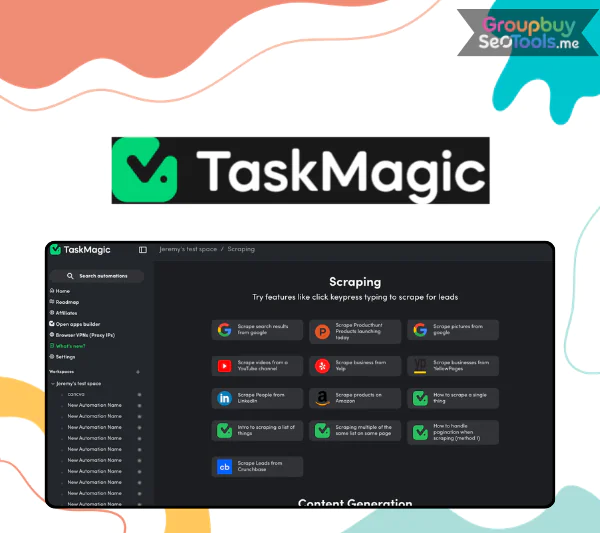
TaskMagic dashboard displaying automation builder for repetitive web actions and workflow management
TaskMagicis an AI-powered automation tool that turns manual online tasks into systems that can be used again and again without the need for computer knowledge. It records what you do on the web and turns those actions into automations that you can use again and again. This way, you don’t have to start from scratch when making processes.
Traditional automation platforms only use API links, but TaskMagic copies how browsers actually work. It can copy what you type, click on buttons, copy information, move between pages, and send forms. That makes it very useful when APIs aren’t available or are restricted.
Users can also use automation templates that are already made for social networks and widely used apps. The platform also has web data extraction features that let you get information straight from websites and use that information to set off automated actions, like sending outreach messages on Instagram or LinkedIn.
To put it simply, TaskMagic fills the gap between doing things by hand and clever automation.Things that make TaskMagic unique
You can do more with TaskMagic than just record things. Businesses, marketers, and agencies can easily scale up routine tasks thanks to its advanced customization options.
Looping with custom data that is flexible: You can load structured data from Google Sheets and run certain steps on the fly. Without having to log in and do the same thing for each post, this saves time. For instance, processing client data lists is much faster because the system instantly goes through rows and follows the workflow you set up.
Launch of Instant Automation: With one click, you can start a whole set of tasks. It’s now possible to finish tasks that used to take 20 to 30 minutes in seconds. This is especially helpful when doing regular office work or running a campaign.
No limits on workflows or tasks: You are not limited by things you can’t change. Since you can run multiple automations at once, it’s easier to test out bigger operational systems without having to worry about slowdowns.
Workspaces and Working Together as a Team: TaskMagic lets you set up different workspaces so you can keep projects separate by client, department, or campaign. Members of the team can be asked to work together while clear limits are maintained, so workflows stay safe and organized.
Custom Steps More Advanced: You can improve automations with extra delays, conditional branches, JavaScript snippets, or data filtering rules, in addition to simple records. This gives you more exact control, which is useful when workflows need to make decisions based on logic or specific times.
Web scraping built in: It doesn’t have to take hours to gather information like product descriptions, prices, or contact information. TaskMagic takes out the data and adds it straight to your automated sequences, so you don’t have to copy and paste it by hand.
Zapier Works With: When standard connections don’t work well enough, TaskMagic can be used with tools like Zapier to handle actions that happen in the browser that API-based systems can’t. This makes it possible for more apps to be linked and makes digital ecosystems run more smoothly.
Triggers for Webhooks: Automations can be set off by signs from outside the system. For example, a webhook can start follow-up workflows, notifications, or data processing steps right away when a new lead is added to your CRM.
Ideas for AI Workflow: The app also looks at what you’re doing and suggests more ways to automate it. These insights from AI help find jobs that take a lot of time and could be made even easier.
Tags and Controlling Permissions: Tags can be used to group processes together so that they are clear and private. You can set the permissions of users to make sure that private processes stay safe.
Adding Google Sheets Support: You can easily move data from one source to another in Google Sheets. This makes sure that all team members work with the same information and keeps records up to date immediately.
Samples that are ready to use: If you’d rather get started right away, TaskMagic has templates that you can change for Instagram campaigns, LinkedIn outreach methods, and other marketing tasks that you do over and over again. You can change these templates to fit your needs or your brand’s standards.
TaskMagic Pricing Plans Comparison
Features
Free Forever
Apps
Apps + Browser
Price
$0 / month
$29 / month
$49 / month
Unlimited Apps
✔
✔
✔
Unlimited Steps
✔
✔
✔
Unlimited Tasks
✔
✔
✔
Unlimited Workflows
✔
✔
✔
Unlimited Workspaces
✔
✔
✔
Webhooks
✔
✔
✔
Filter, Math, Delay & Advanced Steps
✔
✔
✔
Team-Based Permissions
✔
✔
✔
Record Clicks & Typing
✔
✔
✔
Cloud Runtime for Browser Recording
15 hours
15 hours
15 hours
Website Scraping
✔
✔
✔
Summary:
Free Forever is perfect for users who want full automation features without upfront cost.
Apps is ideal for growing teams needing scalable app-based automation.
The right service is just as important as the tool itself if you are thinking about TaskMagic. At GroupbuySeoTools , we care about more than just prices. We also care about trustworthiness, openness, and long-term value.
Verified & Ready-to-Use Accounts: Every account is carefully checked before delivery. You receive access that works immediately, so there is no frustrating setup delay.
Competitive Pricing – $99 Flat: The price is straightforward. No surprise charges. No hidden extras. Just a solid deal that stands strong against other offers on the market.
Simple Payment Options: Checkout is smooth with MOMO or Online Banking. The process is quick, secure, and convenient.
7-Day Money-Back Policy: Not satisfied? You can request a full refund within seven days. That removes the risk from your decision.
Support Available 24/7: Whenever you need assistance, the support team is there. Fast responses and practical solutions are part of the service.
How to Purchase and Start Using TaskMagic
Getting started does not require technical skills. The process is straightforward and designed for convenience.
Buying TaskMagic
Choose Your Plan: Select the package that fits your needs and add it to your cart.
Review Your Details: Double-check your order information before moving forward.
Select Payment Method: Pick MOMO or Online Banking and make sure you provide the correct email address for account delivery.
Receive Your Access: After payment confirmation, login credentials will be sent directly to your email. Follow the activation steps and you are ready to go.
How to Use TaskMagic Effectively
Define the Process You Want to Automate: Start by identifying repetitive online actions. TaskMagic records clicks, typing, and copy-paste actions, converting them into repeatable workflows.
Select Your Automation Mode:
Guided Mode: Ideal for most users. It walks you through each action step by step and asks for confirmation to ensure accuracy.
Apps Mode: Similar in concept to Zapier-style integrations, allowing connections with external platforms.
Original Recorder: Offers deeper control for experienced users who want full flexibility.
Record Your Workflow: Click Record and perform the task normally. In Guided mode, confirm each action so the automation mirrors your exact steps.
Configure Triggers:
Scheduled Runs: Execute tasks at fixed times or recurring intervals.
Webhook Activation: Launch automations when new data appears, leads arrive, or updates occur.
App-Based Triggers: Integrate with 100+ applications to initiate workflows automatically.
Launch the Automation: Run your workflows from your desktop or cloud environment with a single click.
Advanced Integrations (Optional): Combine TaskMagic recordings with API connections to build more complex systems beyond what traditional automation tools typically allow.
Video Tutorial
Watch this walkthrough to see TaskMagic in action:
Key Advantages of TaskMagic
Smart Automation Capabilities: TaskMagic can do digital tasks like clicking, typing, copying, and pasting that you do over and over again. This makes things more consistent while requiring a lot less human work.
Interface that is easy to use: The style is clean and simple. You don’t need to know how to code to start. Beginners can quickly make workflows, and expert users can make complex systems.
Customer service that is helpful: A lot of people like how helpful the support team is. When questions come up, help is clear and useful.
Collection of Powerful Web Data: The built-in scraping tools make it easy to get data from websites. This is useful for study, getting leads, keeping an eye on competitors, and gathering content.
Flexible Workflow Customization: You can make processes that fit your business plan or the needs of your industry, going beyond simple recording.
Strong User Feedback: Customers often say that using TaskMagic made them more productive, less likely to make the same mistakes, and more comfortable with how things worked.
Potential Drawbacks
Early Learning Curve: It’s easy for beginners to get started, but you may need to try different things and practice a lot before you can reach your full potential.
Over-Automation Risks: If you automate every job without checking on them, you might not be able to see how some processes are going. It’s important to have strategic balance.
Needs Occasional Monitoring: Workflows that are very complicated may need to be changed from time to time, especially if websites or systems change.
Needs an Internet link: Because it uses AI-powered features, it works best when it has a stable internet link.
Who Can Benefit from TaskMagic?
For entrepreneurs and small business owners, it’s perfect for running online operations, cutting down on administrative work, and making more time for long-term growth.
Freelancers and Agencies: Social media managers, virtual helpers, and marketing professionals can speed up client work without sacrificing quality.
E-commerce Sellers: Works with Shopify, WooCommerce, and Amazon, which makes it easier to change products and handle orders.
Teams Working From Home: Standardized, automated processes help teams working from home stay on the same page.
Social media managers and content creators can schedule posts, keep track of engagement, and handle multiple accounts without having to switch between platforms all the time.
Analysts and researchers who do a lot of routine reporting or online data collection can cut down on the amount of work they have to do by hand by a huge amount.
Bottom Line: If repetitive online tasks consume your time, TaskMagic can automate them—no programming skills required.
Frequently Asked Questions
Is TaskMagic suitable for beginners?
Yes. It’s made to be easy to use, but it also has advanced tools for people who already know how to use them.
Can it extract data from websites?
Yes, TaskMagic has powerful scraping tools for getting information from the web.
Do I need coding knowledge?
Not at all. The app lets you record and create visual workflows without having to know how to code.
What types of tasks can be automated?
Form submissions, email handling, data entry, file management, posting on social media, collecting leads, and e-commerce are some examples.
Is internet access necessary?
Yes. A reliable connection ensures automation features function properly.
How does it improve productivity?
It frees up people and teams to focus on smart and creative work by getting rid of the need to do the same things over and over again.
Can workflows be customized?
Absolutely. You can adapt automations to match specific personal or business requirements.
Conclusion
TaskMagic isn’t just another automatic app; it’s a useful tool that makes you more productive. Even though software can’t solve all operational problems, this tool can make things run more smoothly when used wisely.
The real gain is getting back hours that were lost to doing the same things on a computer. TaskMagic gives you the structure and accuracy you need to work better, whether you work alone or with a growing team.
If you want to make your operations more efficient and improve your processes, GroupbuySeoTools is a safe way to get to TaskMagic and start changing the way you work.
 Google
 Microsoft
 Adobe
Adobe Canva
Canva Kaspersky