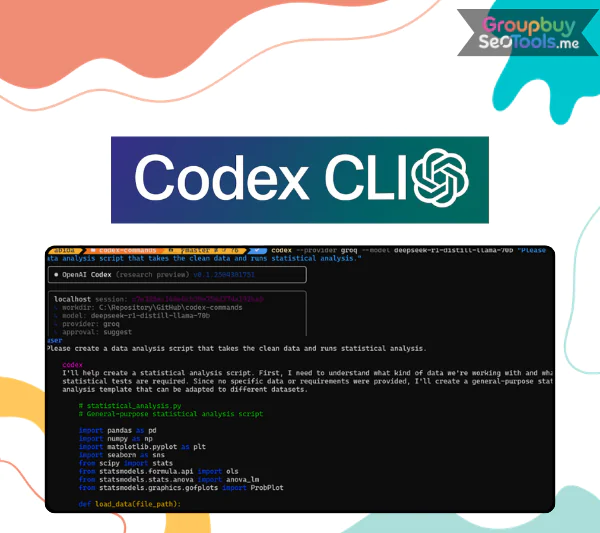
These days, making software moves very quickly. Changing between your IDE, web tabs, help pages, and AI chat tools all the time? That stuck-on stuff adds up quickly. The game changes when Codex CLI adds an AI coding helper right to your terminal.
Codex works where you already build, so you don’t have to copy and paste bits. From the command line, you can use it to look at repositories, change files, run commands, review pull requests, and even automate structured processes. This tool keeps everything clean and local for devs who care about speed, control, and a smooth engineering process.
Codex CLI is small and protects your privacy. It was made to run on your own computer. It helps you with AI-powered tasks without making you use browser-based processes or putting private projects at risk without need.
What Is Codex CLI?
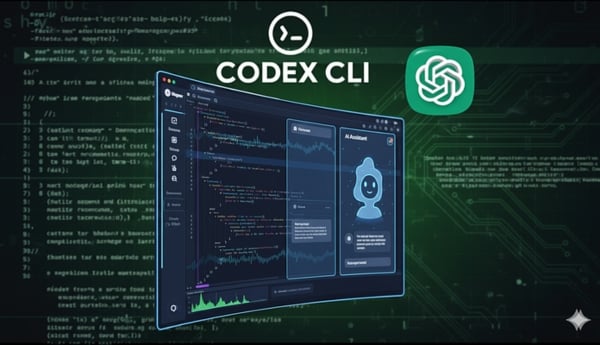
Codex CLI scanning and interacting with source code directly within a local development workspace.
Codex CLI is an AI programming helper that works in your terminal and is accessed through the command line. It doesn’t work as an add-on for your browser or an outside chat tool; instead, it runs directly in the directory of your choice for the project. In other words, it can look at real files, references, and settings in your workspace.
Codex CLI works well with little extra work because it was built in Rust to be fast and reliable. It has low latency and can look at big codebases, make exact changes, write detailed commit messages, and support structured development workflows. This method feels natural if you like workflows that are led by the keyboard and local tools.
It works with different levels of accounts, such as Plus, Pro, Business, Edu, and Enterprise. This means that it can be used by solo workers, startups, and big companies that need AI help but don’t want to hire outside help. You keep control of your code because it runs locally, and you get the benefits of smart AI.
Core Features of Codex CLI
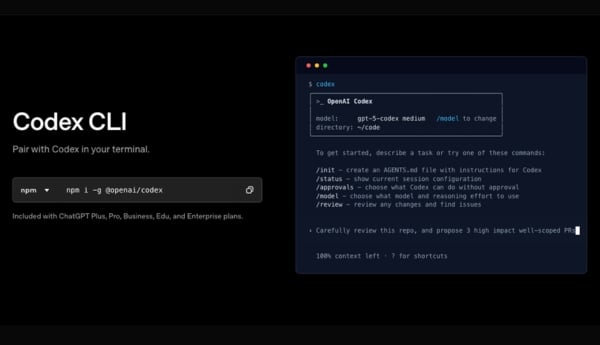
Overview of Codex CLI capabilities designed for professional software development workflows.
- Experience an interactive terminal: When Codex CLI starts up, it looks like a live terminal. Once it’s turned on, you can talk to the AI right now without leaving the command line. In this way, you can ask questions about your source code, modify files, or quickly iterate without interrupting your work.
- Model Choice and Control of Inference: You can change how the AI works at any time. This tool lets you change between GPT-5-Codex and GPT-5. You can also change the amount of inference based on whether you want faster output or more in-depth reasoning. This gives you the freedom to choose the right speed, cost, and knowledge for the job.
- Support for Image Input: As part of your requests, Codex CLI will accept screenshots, interface mockups, and design documents. It looks at both text and images at the same time, which makes it easier to turn design ideas into working code or fix UI problems. This helps a lot when working with design teams though.
- Ability to Review Code from a Distance: A standalone agent in Codex can do organized code reviews before changes are committed or merged. This helps find mistakes in logic, slowdowns in speed, stylistic issues, and possible bugs early on in the process. It’s kind of like having a peer reviewer ready all the time.
- Web search built in: Need new documentation or proof that an API change has been made? With Codex CLI, you can get up-to-date information from the web right in your terminal. That means fewer browser tabs and faster access to the tools you need.
- Codex Cloud Running: From your terminal, you can start Codex Cloud jobs. Choose a remote setting, run complex tasks there, and then copy the outcomes back to your local project. This set-up lets you share more difficult tasks while still keeping an eye on things and being in charge.
- Automation by writing scripts: With the exec tool, you can make Codex scripts that can be run over and over again. Routine jobs like testing, refactoring, setting up an environment, or validating can be turned into AI-assisted workflows that can be used again and again. Focus more on less repeat.
- Help for the Model Context Protocol (MCP): The Model Context Protocol (MCP) works with Codex CLI, which lets writers connect third-party tools, services, and extended contexts. This makes it more flexible and makes it easier to use in formal engineering settings.
- Configurable Modes of Approval: You decide how much supervision is needed before any changes are made to files or commands are run. Codex CLI lets you choose the amount of control you want, whether you want to confirm everything by hand or have some tasks done automatically. You are in charge of everything.
How to Get Started with Codex CLI
Step 1: Install Codex CLI
Installation is straightforward thanks to npm distribution. If Node.js and npm are already installed, simply run:
npm i -g @openai/codex
This installs Codex CLI globally, making it accessible from any terminal session on your system.
Step 2: Launch Codex in Your Project
Open your terminal and navigate to your project directory. From there, start Codex. It will scan your repository, read and write files, execute commands, and assist with development tasks. On first launch, you will log in using your ChatGPT credentials or an API key.
Step 3: Keep Codex Updated
Codex CLI evolves continuously with improvements and new functionality. To upgrade to the latest release, run:
npm i -g @openai/codex@latest
Checking the changelog before updating is recommended so you understand new features or adjustments introduced in each version.
Why Developers Choose Codex CLI ?
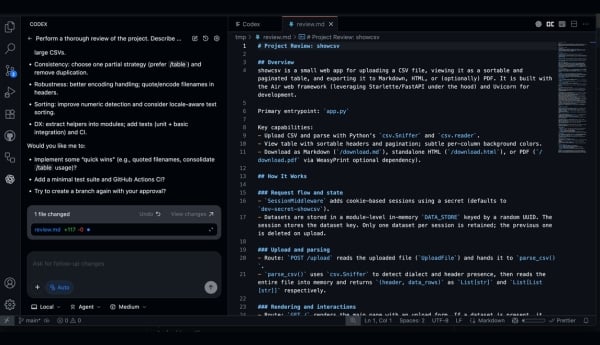
Using Codex CLI to streamline development and eliminate unnecessary tool switching.
- Easy to set up and use right away: It only takes seconds to run and starts right away. It doesn’t have any complicated settings or take a long time to start up. This is important if you care about speed.
- Few system dependencies: It keeps your work environment clean with Codex CLI because it doesn’t need any complicated external dependencies. Less variables mean less problems with compatibility.
- Performance That Works Well: Codex CLI works smoothly with little CPU and memory use, even when analyzing multiple files or doing advanced review tasks. This is because it is based on Rust.
- Local execution to have more control: Codex can read and change files in the location you choose when it is running directly on your computer. When compared to browser-only tools, sensitive code stays under your control, lowering its exposure.
- Architecture that is good for automation: It works well with automated processes, like CI/CD workflows. It works well for grammar checking, refactoring, and structured testing because it doesn’t take up much space and can be run as a script.
- Not as many context switches: By keeping AI help inside the desktop, you won’t have to keep switching between apps. This makes it easier to focus, cuts down on feedback loops, and makes the development process more organized.
- Made for individuals and groups: Codex CLI can be used by anyone, from freelancers working on their own projects to engineers working as part of a bigger team. It can be adjusted to fit your needs. It’s strong without being too much; it’s useful, flexible, and ready for real growth.
GroupbuySeoTools is a good choice for developers and teams that need professional AI code help without having to pay too much. They offer access to Codex CLI accounts at reasonable prices and with reliable support.
Codex CLI Plans & Pricing Comparison
| Feature |
Plus Plan
$20/month |
Pro Plan
$200/month |
Business Plan
$30/user/month |
Enterprise & Edu
Custom Pricing |
| Best For |
Weekly focused development sessions |
Full-time developers using Codex daily |
Startups and growing teams |
Large organizations & institutions |
| Access Methods |
Online, CLI, IDE plugin, iOS |
All Plus features |
All Plus features |
All Business features |
| Model Access |
Latest models incl. GPT-5.2-Codex |
All Plus models |
All Plus models |
Full enterprise-level access |
| Local Usage Limits |
GPT-5.1-Codex-Mini with 4x larger local limits |
6x increased local & cloud limits |
Standard Plus limits |
Scalable enterprise capacity |
| Cloud Code Reviews |
Automated code review |
10x more cloud code reviews |
Enhanced performance with larger VMs |
Enterprise-scale review & compliance tools |
| Performance |
Fast & lightweight AI coding support |
Priority processing + sustained workloads |
Accelerated cloud execution |
Company-wide priority processing |
| Security |
Standard security |
Standard security |
SAML SSO, MFA, secure team workspace |
SCIM, EKM, RBAC, domain verification |
| Data Handling |
Flexible usage via ChatGPT credits |
Flexible usage via ChatGPT credits |
No training on business data by default |
Advanced data retention & residency controls |
| Admin & Governance |
— |
— |
Admin controls for teams |
Audit logs, Compliance API, analytics & governance |
| ChatGPT Features Included |
All ChatGPT Plus features |
All ChatGPT Pro features |
All ChatGPT Business features |
All Enterprise/Education ChatGPT features |
Advantages
- Local execution with full oversight: Codex CLI operates directly on your machine, inside the directory you choose. It can inspect, modify, and execute code while keeping everything under your supervision. For teams handling confidential or proprietary repositories, that level of transparency and authority is not optional — it is essential.
- Quick, responsive, and resource-conscious: The tool launches almost instantly and maintains strong performance without draining system resources. Even when navigating extensive repositories, it remains smooth and stable without slowing down your workflow.
- Built around the terminal environment: Codex CLI is designed specifically for command-line users. It blends naturally into your development habits, allowing you to code, review, execute commands, and automate tasks without switching platforms.
- Designed for professional workflows: Features such as approval settings, multi-agent reviews, scripting functionality, and Codex Cloud support extend its use beyond simple code suggestions. It adapts to collaborative environments and real production pipelines.
- Customizable AI control: Developers can switch between available models, including GPT-5-Codex and GPT-5, while adjusting reasoning depth depending on project demands. This flexibility allows precise tuning of speed, cost, and output quality.
- Automation-ready architecture: With minimal dependencies and strong scripting support, Codex CLI integrates smoothly into CI/CD processes and automated development systems.
Disadvantages
- Not everyone can use terminal-first design. Codex CLI is best for developers who are used to working in command-line settings. People who like graphical IDE add-ons or browser-based tools might need some time to get used to it.
- Needs a Paid ChatGPT Plan: You can only access it if you have a Plus, Pro, Business, Edu, or Enterprise plan. This could be a problem for developers who want a free option with all the features they need.
- It takes work to get better at things: Even though basic functions are easy to understand, you need to have experience with scripting, MCP integration, and structured approval processes in order to master them. People who are new to an app often start by using the most basic features before venturing into its full potential.
Who Should Use Codex CLI?
- Fans of the command line: Engineers who spend a lot of time in the terminal will like having AI help built right into their process, without having to open any extra tools.
- Backend, infrastructure, and DevOps workers will find it very useful for server-side development, system operations, and deployment pipelines because it can be run locally, scripts can be changed, and it focuses on automation.
- Teams working with private or sensitive repositories: It works for groups that are in charge of private or proprietary codebases because it runs locally and follows permission settings.
- Independent developers: Iterations are faster for solo coders, there is built-in review help, and there are fewer context switches while they are coding.
- Businesses that already use ChatGPT’s business tiers: Companies that have the Business, Enterprise, or Edu plan can easily add Codex CLI to their current AI system.
- Power users who are interested in automation: This is a great resource for developers who like to script, customize workflows, and connect third-party tools through Model Context Protocol.
What You Receive When Purchasing from GroupbuySeoTools?
- Complete understanding before buying: At GroupbuySeoTools, we test Codex CLI in real-life development situations to see how well it works. Now you know not only what it does, but also when and how to use it best.
- Guided training step by step: When you buy something, it comes with structured setup directions, workflow suggestions, and tried-and-true ways to use it, so you can start right away with confidence.
- Honest, developer-centered analysis: We make it clear what our strengths and weaknesses are. There will be no empty claims, just honest information that will help you be more productive.
- If they are available, extra items for getting work done: You might get extra resources like CLI optimization tips, automation samples, or workflow templates that are meant to help you work better, depending on what’s available.
Frequently Asked Questions
- Does Codex CLI run locally or in the cloud?
The main tool works on your machine in your terminal. Some tools, like Codex Cloud tasks or the built-in web search, depend on cloud services. However, you can still see and control all actions with your approval settings.
- Is Codex CLI free to use?
You need to be subscribed to ChatGPT Plus, Pro, Business, Edu, or Enterprise in order to access it. It’s not available as a free app that works on its own.
- Can Codex CLI modify my project files?
Yes, but only if you give your permission. You can choose whether approval controls can suggest changes, make changes, or run tasks.
- Does it handle large repositories effectively?
Yes. Codex CLI is optimized for performance and can analyze substantial codebases, making it suitable for enterprise-scale projects.
- Is it compatible with CI/CD environments?
Of course. Because it is lightweight and can be scripted, it works well for automated development and deployment processes.
- Is it secure for private or proprietary source code?
Yes. You have full control over what it can read, change, or run because it runs locally and follows the permissions you set.
Conclusion
Codex CLI is a big improvement if you are sick of switching between different tools and want AI help built right into your development process. It works quickly, locally, and was made for experts who value control over shortcuts.
When you buy something through GroupbuySeoTools, you get more than just access. You also get structured advice, clear insights, and useful support to help you use the tool with confidence. Codex CLI is a good place to start for developers who want to be more productive, use automation, and keep their processes organized.
 Google
 Microsoft
 Adobe
Adobe Canva
Canva Kaspersky